




This guide shows you how to create RF coverage maps using Radio Mobile to visualize repeater coverage and simplex range from a fixed or mobile ham radio station. Whether you’re evaluating a new antenna, planning a repeater site, or testing real-world signal reach, Radio Mobile lets you generate detailed, terrain-aware coverage maps in just a few steps.
You’ll be using Radio Mobile Online, a free, web-based RF coverage mapping tool created by Roger Coudé (VE2DBE) specifically for amateur radio operators. It models radio propagation over real terrain to predict coverage between fixed and mobile stations without requiring any software installation.
1 Why Use Radio Mobile for RF Coverage Maps?
Radio Mobile Online combines digital elevation models and propagation algorithms to produce realistic RF coverage maps for frequencies ranging from HF through microwave bands. It is widely used by hams for VHF and UHF repeater planning, mobile coverage estimation, and point-to-point link analysis.
While the tool does not model building attenuation in dense urban environments, it provides highly accurate terrain-based predictions for most amateur radio use cases – making it one of the most practical free RF coverage map generators available.
2 Step 1: Create an Account
To get started, visit the Radio Mobile Online website and register for a free account. Registration is quick and straightforward:
- Click on the registration link.
- Provide your name or callsign and email address.
- Submit the form.
Within moments, you’ll receive an email with your login credentials. Once logged in, you’ll have access to the site’s full range of features, including the ability to create and save multiple transmitter sites and coverage maps.
3 Step 2: Plot Your Transmitter Location
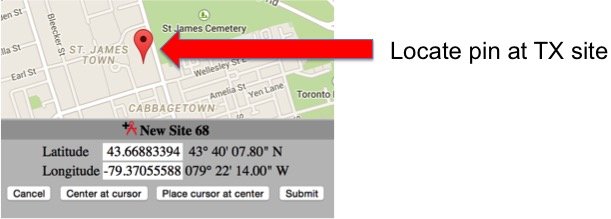
After logging in, select the “New Site” option from the left-hand menu. You’ll see a world map with a red pin representing your transmitter location.
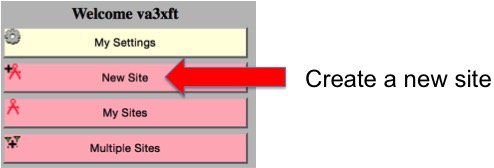
How to Plot Your Location
You have two methods to define your transmitter site:
-
Manual Input: If you know the precise coordinates of your transmitter site, enter the latitude and longitude directly into the provided fields.
-
Interactive Map: Drag and zoom the map to locate your desired position, then click to place the red pin. For greater detail, switch to the Satellite View to identify buildings, towers, or other landmarks.
Once the pin is correctly positioned, click “Submit” to save your site.
4 Step 3: Create an RF Coverage Map
With your transmitter location saved, you’re ready to generate your RF coverage map. Select the “New Coverage” option from the menu. You’ll be prompted to define your station parameters through several input fields.
Key Fields to Complete
- Centre Site: Choose your saved transmitter location from the dropdown menu.
- Antenna Height: Enter the height of your antenna above ground in meters. (To convert feet to meters, divide by 3.28.)
- Antenna Type: Select “Omni” unless you’re using a directional antenna.
- Frequency: Specify your transmitter’s operating frequency (between 10 MHz and 250 GHz).
- TX Power: Enter your transmitter’s output power in watts.
- Line Losses: Include feedline losses for both the transmitter (TX) and receiver (RX) to improve accuracy.
- Mobile Antenna Settings: Define the receiving antenna’s height (in meters) and gain (in dBi) for mobile stations.
- Maximum Range: Set the analysis range in kilometers. (To convert miles to kilometers, multiply by 1.6.)
- RX Threshold: Specify the lowest signal strength to display on the map (e.g., -120 dBm for general sensitivity).
Refinements for Advanced Users
- Antenna Azimuth and Tilt: Adjust these settings if you’re using a directional or high-gain antenna to account for its beam pattern.
- Required Reliability: Increase this value for a more conservative estimate of coverage in challenging environments.
5 Step 4: Wait for Processing
After entering your data, click “Submit” to generate the map. Processing can take anywhere from a few minutes to 20 minutes, depending on the complexity of the map and server traffic. Once complete, your coverage map will display as an overlay on the terrain. To save the map, click “Add to my coverages.”
6 Interpreting Your RF Coverage Map
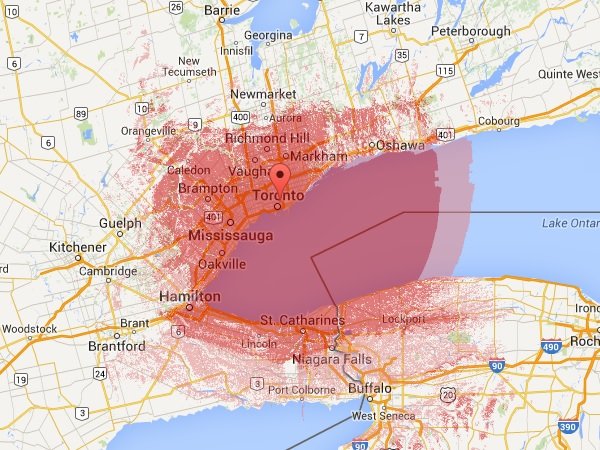
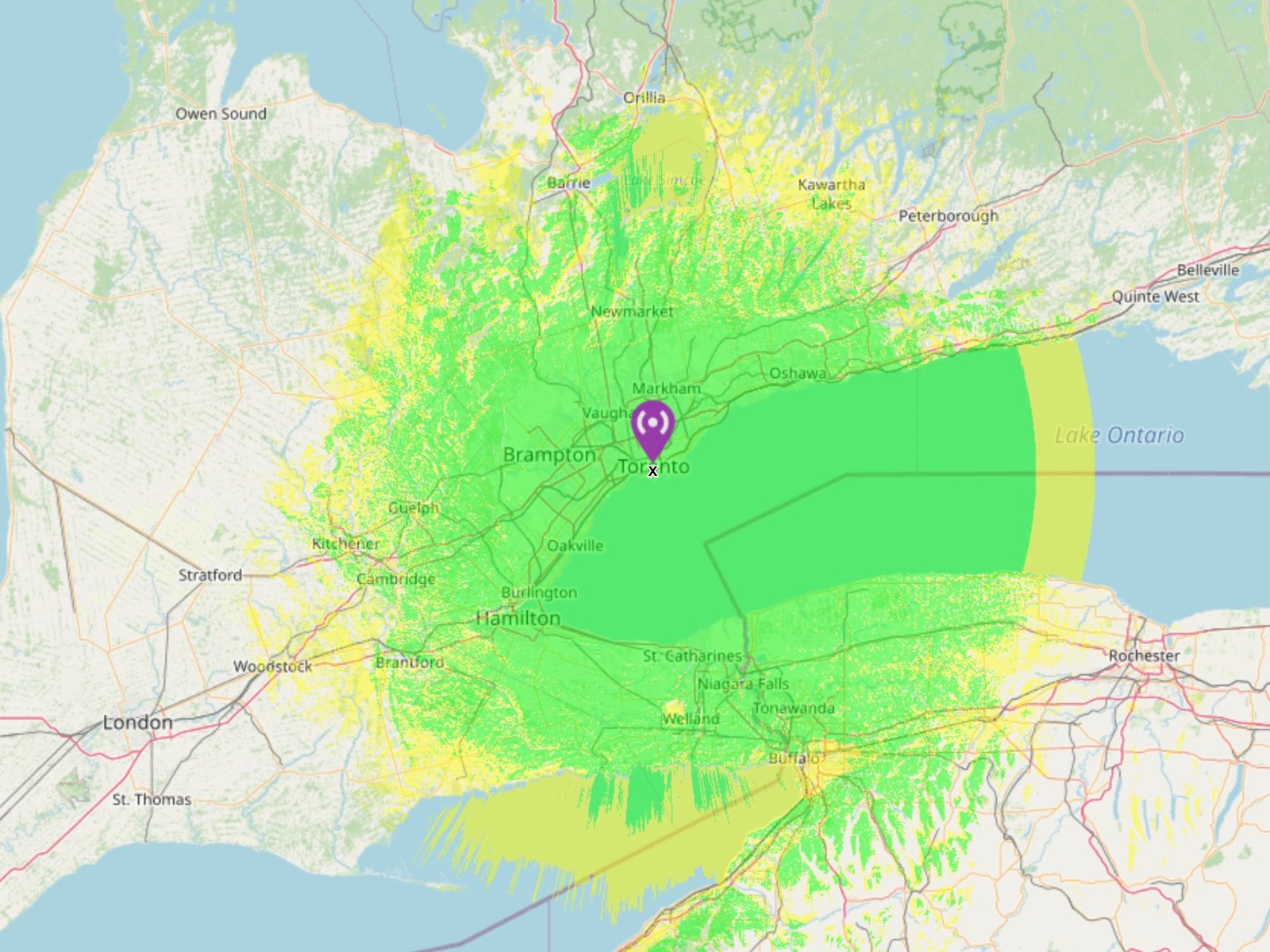
The coverage map displays areas where your signal is expected to reach based on the specified parameters. Typically:
- Green Areas: Stronger signals and better coverage.
- Yellow Areas: Weaker signals and marginal coverage.
Things to Keep in Mind
- Urban Limitations: In densely populated areas, the map may not account for building obstructions, leading to optimistic estimates.
- Terrain Influence: Natural features like hills, mountains, and valleys significantly impact signal propagation. Radio Mobile Online’s terrain data helps account for these factors, providing reliable predictions for rural and open areas.
7 Practical Applications of RF Coverage Maps
RF coverage maps are valuable for various amateur radio purposes:
- Repeater Planning: Assess potential sites to ensure maximum coverage for your community.
- Simplex Range Optimization: Fine-tune antenna height, power, and gain to maximize your station’s range.
- Microwave Links: Visualize point-to-point connections for high-frequency bands.
- Event Planning: Determine coverage for temporary stations or emergency operations.
By combining the predictive power of Radio Mobile Online with on-the-ground testing, you can gain a comprehensive understanding of your station’s performance.
8 Tips for Success
- Experiment with Parameters: Small changes in antenna height or power can significantly impact coverage. Test multiple configurations to find the optimal setup.
- Compare Maps: Generate coverage maps for different locations to identify the best site for your repeater or station.
- Collaborate: Share your maps with fellow hams to gather feedback or plan group projects.
9 Start Mapping Today!
Creating RF coverage maps has never been easier. With Radio Mobile Online, you have a powerful tool at your fingertips to visualize and optimize your station’s performance. Whether you’re planning a new repeater, testing antenna setups, or exploring your range, this tool can help you make data-driven decisions.
Visit Radio Mobile Online today and start creating professional RF coverage maps to share with your ham community!
You Might Also Like
- DMR vs Fusion vs D-Star: How to Choose the Right Digital Ham Radio Mode
- Analog vs Digital Voice: Key Differences Every Ham Should Know
- What Is Digital Voice in Ham Radio? A Complete Beginner’s Guide
Some links in this story are affiliate links. If you choose to buy through them, EvoHam may earn a small commission – at no extra cost to you. It helps support more stories like this.