



Over the years, the world of amateur radio has seen remarkable growth in the adoption of digital voice technologies, and one of the early pioneers on the ham radio scene was the Connect Systems CS700 portable radio. When the CS700 (UHF) and CS701 (VHF) first appeared around 2014, it captured the attention of many ham enthusiasts for being an affordable entry point into DMR (Digital Mobile Radio). Since then, the digital landscape has evolved considerably—BrandMeister hotspots, updated firmware releases, and improvements in programming software have made the DMR experience far more accessible and user-friendly. This updated and improved review will take a new look at the venerable CS700, discuss its relevance in today’s market, and provide ham radio operators with fresh insights, tips, and considerations as we head further into the digital radio era.
1 Introduction
Connect Systems CS700 DEALS
When the Connect Systems CS700 was first introduced, many amateurs were excited because it represented an affordable, user-friendly ticket into digital radio. Before its release, many DMR-capable radios either had steep price tags or were designed primarily for commercial markets. The CS700 helped pave the way for more widespread DMR adoption among ham radio operators by providing a relatively simple path into the new digital frontier.
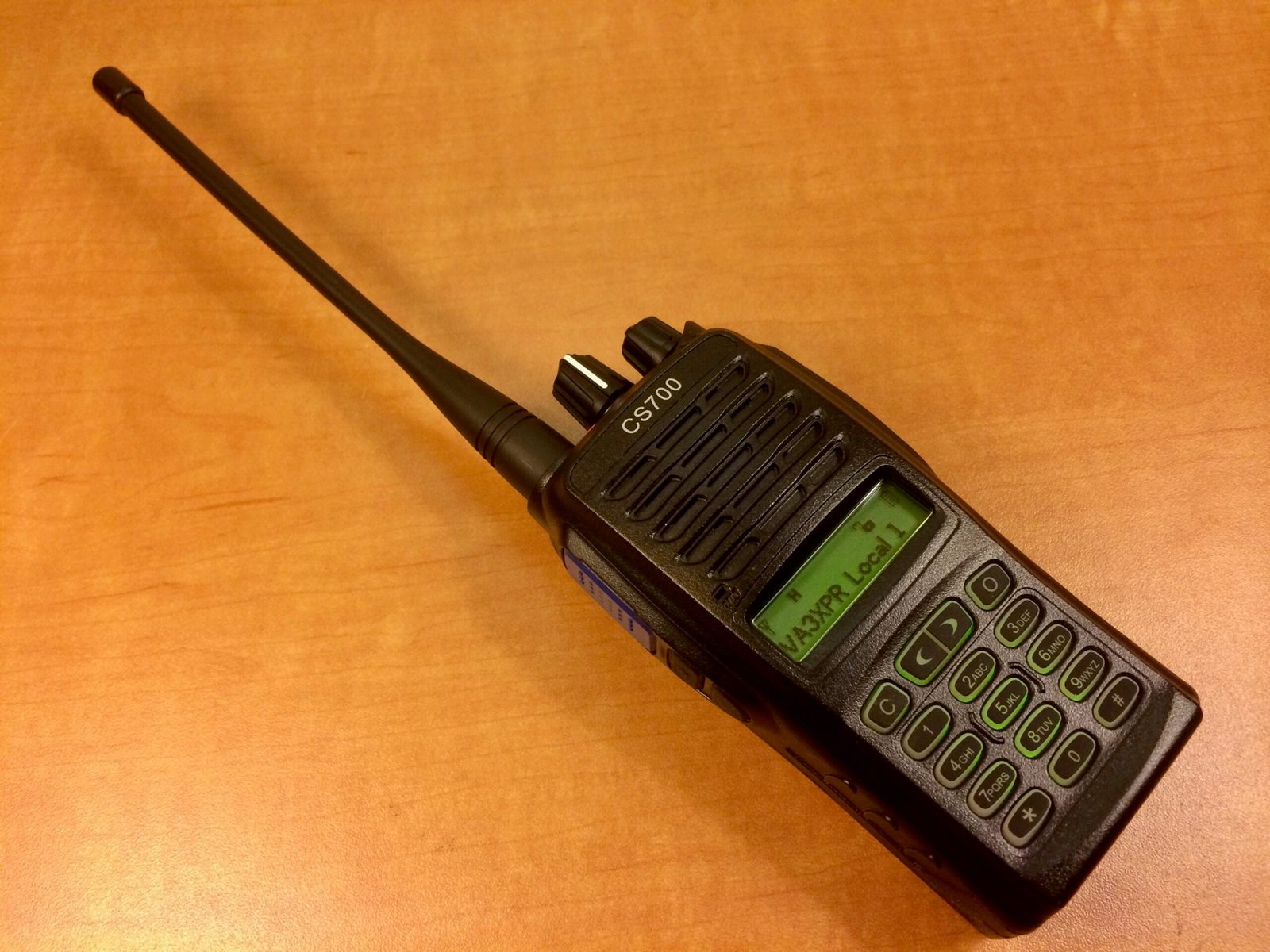
Fast forward to today, the amateur radio world is more digital than ever. Whether it’s DMR, D-STAR, Fusion, or P25, digital modes are now mainstream. Radio makers continue to release new models with advanced features, color screens, multi-band capabilities, and even Wi-Fi connectivity. Despite this, the CS700 remains a viable option for anyone seeking a rock-solid single-band UHF DMR radio. Connect Systems, known for their customer-focused approach, continued to release firmware updates and maintain an active presence in the ham radio community.
This updated review explores how the CS700 fits into the modern DMR landscape, how it performs in real-world conditions, what its strengths and weaknesses are, and which features still stand out. We’ll also highlight new developments that matter to owners of this radio or those considering a used one. By the end, you should have a clear picture of whether the CS700 is still worth your investment—and if so, how to maximize its potential.
2 What is DMR and Why Does It Matter?
Connect Systems CS700 DEALS
Digital Mobile Radio (DMR) is an open standard defined by the European Telecommunications Standards Institute (ETSI). Originally designed for commercial and professional two-way radio users, DMR’s efficient spectrum use, robust error correction, and time-division multiple access (TDMA) approach quickly made it popular among hams seeking clear digital voice communications and worldwide connectivity via repeaters and online networks.
For amateur radio operators, DMR offers:
- Crystal-Clear Voice Quality: Digital signals have less noise and can carry further while retaining clarity.
- Talk Group Flexibility: One frequency can be used to host multiple virtual channels or “talk groups,” enabling localized or worldwide QSOs.
- Efficient Use of Spectrum: TDMA splits a frequency into two time slots, effectively doubling channel capacity.
- User ID and Contact Management: Every user has a unique DMR ID, making it possible to display call signs, names, and other details on radio screens.
- Integration With Hotspots and Internet Gateways: Operators can tap into global networks like BrandMeister for international communication from virtually anywhere.
Though the Connect Systems CS700 was among the first to bring DMR to a broad ham audience, the ecosystem now includes a plethora of hotspots, smartphone-linked devices, and advanced transceivers. However, if you want to see what DMR can do without breaking the bank, the CS700 still deserves a close look.
3 First Impressions and Build Quality
Connect Systems CS700 DEALS
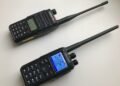
At first glance, the Connect Systems CS700 is a no-frills, business-like handheld radio. It features a standard black casing, robust plastic construction, and a relatively compact form factor for a single-band UHF transceiver. The controls are intuitive: a rotary knob on top controls volume, and another adjusts the channel. The push-to-talk (PTT) button is comfortably placed on the left side, along with two programmable side buttons that can be assigned to various functions (e.g., high/low power toggle, zone switching, or squelch off).
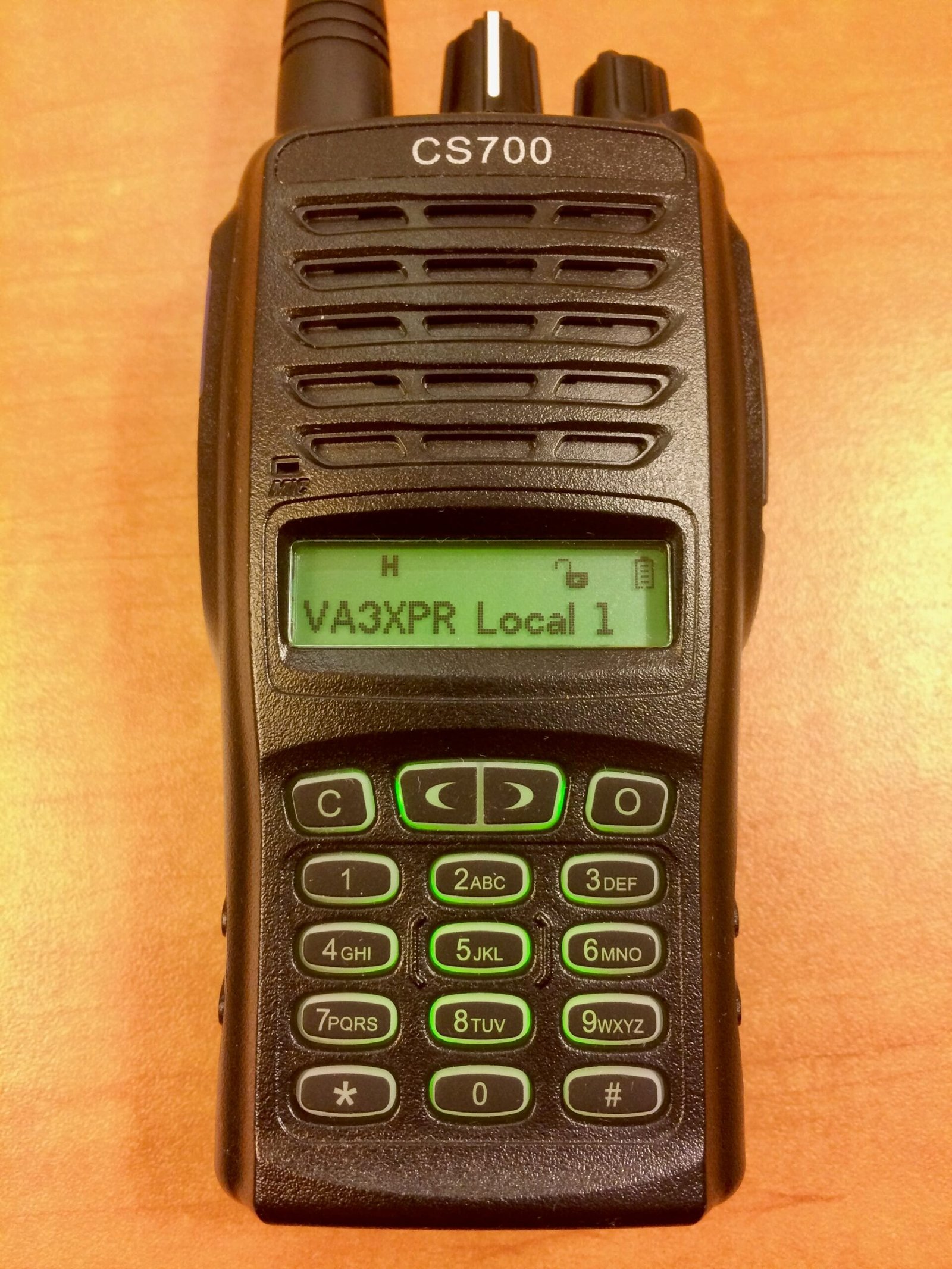
Despite being several years old, the CS700’s build quality has stood the test of time fairly well. The radio can withstand typical knocks and bumps of field use without issues. The keypad, while somewhat basic, is tactile and can be used even with gloves on. The backlit LCD is straightforward—monochrome, but bright enough to be visible outdoors in daylight.
Some operators might be spoiled by modern color screens or sleek, ergonomic shapes found in newer digital radios. However, if your priority is performance, reliability, and cost-effectiveness, the CS700’s conservative design is more than sufficient. This radio is all about function over form—a design ethos that many hams appreciate.
4 Key Features & Specifications
Connect Systems CS700 DEALS
While the CS700 is not the newest radio on the market, it includes many features you’d expect from a single-band UHF DMR transceiver. Key highlights include:
- Frequency Range: 400–470 MHz (UHF)
- Channel Capacity: Up to 1024 channels
- Zones: Up to 64 zones, each containing up to 16 channels
- Power Output: Switchable between approximately 1W (low) and 4–5W (high)
- DMR Tier II Compliance: Suitable for amateur radio repeaters and conventional digital operation
- TDMA Technology: 2-slot operation on a 12.5 kHz channel
- Analog FM Support: Allows use on analog repeaters and simplex frequencies
- Programming Software: Windows-based CPS (Customer Programming Software)
- Battery Life: Approximately 10–12 hours on a 1700 mAh Li-Ion pack
Even by current standards, these specs remain fairly competitive for a single-band UHF DMR handheld. Of course, if you desire VHF+UHF dual-band capability, you’ll need to look at models like the Connect Systems CS750 or other dual-band offerings. Nonetheless, as an affordable dedicated UHF DMR radio, the CS700 still packs enough features to be worthy of consideration.
5 Performance and Audio Quality
Connect Systems CS700 DEALS
One of the main selling points for DMR is its audio clarity, and the CS700 generally delivers here. On digital channels, voice quality is crisp and easy to understand, even at weaker signal strengths. When signals do degrade, you may encounter a “robotic” or “choppy” digital artifact rather than static, but this is typical across all DMR radios.
The CS700’s analog FM mode is straightforward and on par with many other monoband handhelds. Its receiver sensitivity is good; however, it may not be the strongest performer in heavily congested RF environments, where more expensive radios equipped with advanced front-end filtering might shine. Still, for everyday use, local repeaters, and field communications, it performs admirably.
Transmit audio is one area where the CS700 has always excelled. Out of the box, most users find that the default mic gain settings produce clean, intelligible audio, though you can adjust audio levels through programming software to match your voice characteristics. If you need even more advanced control, custom firmware solutions (in the earlier days) offered experimental features—but for most, the default settings are just fine.
6 Programming the CS700
Connect Systems CS700 DEALS
Programming a DMR radio can be a bit of a learning curve compared to analog-only models. You have to juggle frequencies, color codes, time slots, talk groups, and contact lists. The Connect Systems CS700 relies on CPS (Customer Programming Software) that runs on Windows. Although the software interface is not flashy by today’s standards, it remains relatively stable and easy to navigate once you understand the basics of DMR.
Codeplug Basics
The term “codeplug” in the DMR world refers to the configuration file that contains all your channels, zones, contacts, and settings. A well-structured codeplug is crucial for making sense of local repeaters and talk groups. Many ham radio clubs or online communities maintain updated codeplugs for various regions, so a quick search might yield an “off-the-shelf” solution you can tweak to suit your preferences. This can save a lot of time versus building your configuration from scratch.
Software Improvements
Initially, the programming software for the CS700 had its share of quirks. However, Connect Systems continued to release updates over the years, and the software became more refined and stable. While it still lacks some of the modern polish of other manufacturers’ offerings, it remains functional for day-to-day usage. The user manual provided by Connect Systems, alongside YouTube tutorials from fellow hams, can help new owners get up to speed quickly.
7 Firmware Updates and Ongoing Support
Connect Systems CS700 DEALS
When it debuted, the CS700 was lauded for Connect Systems’ willingness to listen to the ham community and roll out firmware updates addressing bugs and feature requests. Even though the radio is now considered a “legacy” model compared to the company’s more recent offerings (such as the CS750, CS800D mobile, etc.), there is still some level of support and resources available online.
Legacy vs. Modern Firmware
If you purchase a used CS700 or dust off one that’s been sitting on your shelf, it’s worth verifying the current firmware version. Older firmware might not have certain bug fixes or features introduced later. You can check Connect Systems’ website or community forums to see what the latest supported firmware is and follow the upgrade instructions carefully.
In recent years, many hams have migrated to other models offering dual-band capabilities and color displays. That said, the CS700 user base remains active in online groups and forums, so crowd-sourced support is still readily available. Unlike some other brands that might discontinue all forms of help after new product lines launch, Connect Systems has at least kept older firmware available for those who need it.
8 Field Testing and Real-World Use
Connect Systems CS700 DEALS
One of the best measures of a radio’s value is how it performs in real-world scenarios. The CS700, tested in a variety of conditions—from urban environments to off-grid camping—generally does well in receiving signals with minimal interference. Its battery life, thanks to the Li-Ion pack, can last an entire day if you’re operating at a moderate duty cycle.
Urban Environments
Repeater coverage can be strong, and DMR’s robust digital signal ensures good audio even at lower signal strengths. However, if you’re in a large city with multiple repeaters on various frequencies, you’ll need a well-organized codeplug to avoid confusion.
Off-Grid / Rural Settings
With fewer repeaters available, you may rely more on high-power mode and higher ground to make contact. The CS700’s minimal power draw in receive mode helps extend battery life. An external antenna can also improve range.
Club Events and Public Service
The CS700’s programmable side buttons allow quick toggling of functions like power level or zone change, which can be a big help during events. In digital mode, your transmissions remain clear and crisp, even with moderate background noise.
Weather Resistance
The CS700 lacks an IP67 or IP57 rating, meaning it is not fully waterproof like higher-end portable DMR radios such as the Motorola XPR 7550 or Vertex Standard EVX 539. Light rain or dusty conditions typically don’t pose a problem as long as you take basic precautions, but if you anticipate exposure to harsh environments, you’ll want to invest in a protective case or cover.
9 Integration with Modern DMR Networks
Connect Systems CS700 DEALS
The DMR landscape has expanded greatly since 2014. The BrandMeister network, in particular, allows for seamless worldwide connections through internet-linked repeaters and hotspots. The CS700 easily integrates into these networks as long as you program the correct settings (talk group IDs, time slots, color codes, etc.) into your codeplug.
Hotspot use is increasingly popular. Devices like the OpenSpot or Pi-Star-based hotspots make it possible to use DMR virtually anywhere you have an internet connection—ideal for those who lack local DMR repeater coverage. The CS700’s single-band limitation isn’t an issue for hotspot usage, as most hotspots operate on 70cm (UHF). By programming a simplex channel with the hotspot’s frequency and talk group assignments, you can enjoy global QSOs from the comfort of your home or car.
Many repeaters now also link multiple digital modes under a single gateway, bridging DMR, D-STAR, and System Fusion. This cross-mode functionality ensures that no matter which digital platform you or your friends use, you can typically find a common place to meet on the air. The CS700 remains relevant in such an environment, provided you understand how to set up the talk groups and color codes for bridging.
10 Pros and Cons
Connect Systems CS700 DEALS
Pros
- Affordability: Even new, the CS700 was budget-friendly; on the used market, it’s even more accessible as a first digital radio.
- Solid Audio Performance: Clear digital audio and decent mic audio out of the box, making it easy to get good reports.
- Established User Base: Plenty of community-driven resources, codeplugs, and support available online, thanks to its popularity among early DMR adopters.
- Rugged Design: Sturdy and can handle day-to-day use without issues; side buttons are programmable for quick access to common functions.
- Reliable Analog Mode: Can double as a standard FM UHF handheld for local repeaters or simplex ops.
Cons
- Single-Band Only: The CS700 is strictly UHF (400–470 MHz). If you need VHF coverage, you’ll have to consider other models.
- Basic LCD: Monochrome display with limited real estate can feel dated compared to modern color screens.
- Older CPS Interface: Though functional, the programming software may seem clunky by current standards and requires Windows.
- Limited Advanced Features: No built-in GPS or APRS, no Bluetooth, Wi-Fi, or other modern extras that newer radios might include.
- Firmware Update Process: Firmware support is present but not as frequent or feature-rich as with newer models.
11 Tips for Getting the Most Out of Your CS700
Connect Systems CS700 DEALS
- Organize Your Codeplug:
A well-structured codeplug is essential for seamless operation. Group your channels by repeater or region into different zones. Label your talk groups clearly, so you always know which group you’re on. Many clubs and groups provide codeplug templates you can modify, saving you countless hours of manual entry. - Keep Firmware and CPS Updated:
Connect Systems periodically releases improvements, so check their website or ham radio forums to ensure you’re running the latest firmware. Updated firmware can fix bugs, enhance audio, or provide new features like adjustable mic gain levels. - Leverage Online Community Resources:
The ham radio community is well-known for sharing knowledge. If you’re unsure about DMR settings, how to enter talk groups, or anything else, don’t hesitate to join online forums, Facebook groups, or YouTube channels dedicated to Connect Systems users. You’ll often find codeplugs, programming tutorials, and troubleshooting tips specific to your local repeaters. - Use a Quality Antenna:
The stock antenna works well enough for many situations, but investing in a high-gain aftermarket antenna can significantly improve your range and signal quality. This is particularly important in fringe areas or when you’re operating near the edge of repeater coverage. - Experiment with Digital and Analog:
Don’t limit yourself to digital-only. While DMR is fantastic for many reasons, the CS700 also operates in analog FM mode. Keep a few analog simplex and repeater frequencies in your codeplug for local nets, emergencies, or casual QSOs when digital coverage is spotty. - Join a Local DMR Net:
Many clubs host weekly or monthly DMR nets to help members practice digital procedures and exchange programming tips. Participating in these nets can help you become more comfortable with the digital mode, build your contact list, and even make friends worldwide. - Monitor Battery Health:
Over time, Li-Ion batteries degrade. If you notice a significant drop in battery life, consider investing in a fresh pack. Also, store your battery in a cool, dry place when not in use for extended periods, and avoid fully discharging it regularly to prolong its life. - Customize Side Buttons:
The two programmable side buttons can be assigned to frequently-used functions like high/low power switching, zone scanning, or emergency alerts. Find a setup that matches your operating habits for improved efficiency and convenience. - Practice Safe Firmware Upgrades:
When upgrading firmware, carefully follow the instructions provided by Connect Systems. Interrupting the upgrade or using the wrong firmware file could brick your radio. Always back up your existing codeplug before starting any firmware process. - Consider a Hotspot for Expanded Coverage:
If you live in an area without a DMR repeater or want maximum flexibility, a personal hotspot is a game-changer. With a simple Pi-Star or other hotspot solution, you’ll gain access to worldwide talk groups from your home, office, or mobile environment.
12 Conclusion
Connect Systems CS700 DEALS
Despite being introduced in 2014, the Connect Systems CS700 remains a solid contender in the DMR space. Its affordable price point, user-friendly interface, and time-tested reliability make it a worthy option for anyone dipping their toes into the digital realm. Yes, more feature-rich and modern-looking radios have emerged since then—often with dual-band support, color displays, GPS, and even Wi-Fi or Bluetooth connectivity—but the CS700 continues to hold its own in the areas that truly matter: reliable communication and clear audio.
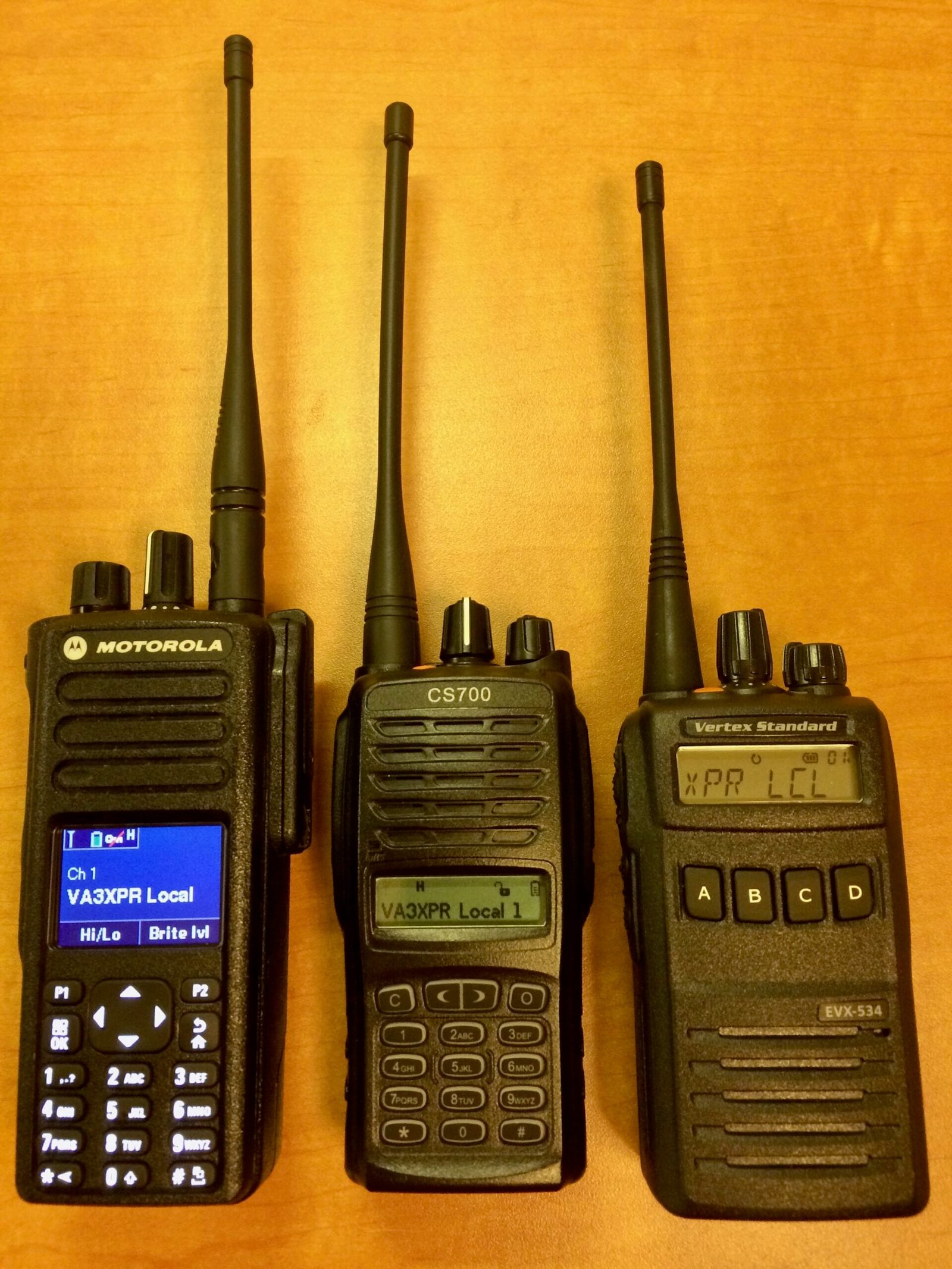
If you’re a ham radio operator who wants to explore digital technology without making a large financial commitment, the CS700 can still be an excellent starting point. The key to success lies in educating yourself on DMR fundamentals, organizing your codeplug effectively, and staying plugged into the ham community for updates and support. With a bit of effort, you’ll be able to join global talk groups, chat with friends across the country or the world, and take full advantage of the expanding digital networks.
For existing owners, the radio’s age is no reason to move on unless you specifically crave the bells and whistles of next-generation handhelds. With the right firmware, codeplug, and a fresh battery pack, your CS700 can continue to serve you for years. Digital radio technology may continue to evolve, but the CS700’s legacy of bridging cost-effectiveness, performance, and user-friendly design remains a noteworthy chapter in the story of amateur radio’s digital revolution.
The Review
Connect Systems CS700
This detailed review of the Connect Systems CS700 explores why this legacy UHF DMR radio remains a reliable and affordable option for both beginners and seasoned ham operators. Highlights include its durable construction, clear audio quality, straightforward programming software, and excellent value for money. While it lacks modern features like dual-band capability or a color display, the CS700 excels as a budget-friendly, no-frills choice for digital communications. The review also includes tips for maximizing its functionality and a breakdown of its pros and cons to help users make an informed decision.
PROS
- Affordable Price
- Loud Audio
- Comprehensive feature set
- Rugged Construction
- Free Software Updates
CONS
- Complex Programming Software
- Audio Quality in FM Mode
- Limited LCD Display
- Inconvenient Accessory Connector
Review Breakdown
-
Build Quality & Durability
-
Audio Quality & Performance
-
Programming & Ease of Use
-
Features & Versatility
-
Battery Life & Power Options
-
Value for Money
Connect Systems CS700 DEALS
We collect information from many stores for best price available