



If you’ve been exploring digital voice on the ham bands, you’ve likely come across modes like DMR, Yaesu Fusion, and P25 – each offering more consistent audio quality and better spectrum efficiency than traditional analog FM. But there’s another mode that often flies under the radar: NXDN.
Originally developed by Icom and Kenwood for commercial and public safety communications, NXDN has quietly made its way into ham radio. With its narrow 6.25 kHz and 12.5 kHz channels, it’s remarkably spectrum-efficient while still delivering clear digital audio. Many hams have discovered that surplus commercial radios – especially older NEXEDGE® and IDAS™ models, can be easily adapted for NXDN use on the 2m and 70cm bands.
Unlike open-source projects such as M17, NXDN is a proprietary digital voice mode, but that hasn’t stopped hams from experimenting. Its simplicity, strong audio performance, and interoperability between Kenwood and Icom equipment make it a practical and reliable choice for local and regional digital communication.
Despite its technical strengths, NXDN has remained far less common in amateur radio than modes like DMR – a question this guide will address directly.
1 What is NXDN?
NXDN is a narrowband digital voice and data protocol that uses FDMA (Frequency Division Multiple Access) to transmit one digital voice signal in a 6.25 kHz or 12.5 kHz channel. This efficiency makes it ideal for congested bands where channel spacing is tight. It’s widely used in professional radio systems and has seen limited but sustained use in amateur radio.
NXDN supports two different channel widths – 12.5 kHz and 6.25 kHz, and each has its purpose. A 12.5 kHz channel, known as NXDN96, is the most common choice and provides excellent audio quality with wide compatibility across NXDN-capable radios.
The narrower 6.25 kHz mode, called NXDN48, is where NXDN’s spectrum efficiency really shines. By using half the bandwidth of a standard narrowband channel, NXDN48 allows two independent 6.25 kHz channels to fit inside the same 12.5 kHz allocation – a major advantage in crowded commercial bands or locations with many users. While amateurs typically use 12.5 kHz for simplicity, 6.25 kHz remains a useful option for experimentation or when channel space is limited.

It’s also worth noting that while NXDN is very spectrum-efficient, it does not offer the same hardware efficiency as DMR. Because NXDN uses FDMA, each 6.25 kHz channel requires its own repeater. In other words, you can fit two NXDN channels inside a 12.5 kHz block, but doing so still requires two separate repeaters – unlike DMR, which provides two simultaneous voice slots within a single 12.5 kHz repeater. This is an important distinction for clubs and experimenters planning ham radio NXDN deployments.
In the commercial world, NXDN appears under the brand names Kenwood NEXEDGE® and Icom IDAS™. Within ham radio, operators use it primarily for simplex and repeater communications, taking advantage of the excellent audio quality and narrow-channel performance. Programming software and cables for NXDN radios are readily available, making it accessible even to newcomers.
2 Why Few Hams Use NXDN
NXDN is technically sound, spectrum-efficient, and widely used in commercial and public-safety radio systems. Yet in amateur radio, it has remained a niche digital voice mode. There isn’t a single reason for this – it’s the result of several practical and historical factors.
Limited infrastructure is the biggest barrier. Unlike DMR, which benefits from large, globally linked networks and thousands of repeaters, NXDN has far fewer amateur radio repeaters and almost no large-scale worldwide linking. In many regions, there may be no active NXDN repeaters at all, making the mode difficult for newcomers to try.
Radio availability also plays a role. Most NXDN-capable radios were originally designed for commercial use by manufacturers like Kenwood and Icom. These radios are often more expensive on the used market, require proprietary programming software, and are less beginner-friendly than modern amateur-focused DMR or Yaesu Fusion radios.
Timing mattered. NXDN arrived in amateur radio around the same period that DMR was rapidly expanding. DMR benefited from strong community momentum, open talkgroup networks, affordable radios, and broad repeater deployment. Once clubs and individuals committed to DMR infrastructure, there was little incentive to add another digital voice ecosystem.
Finally, NXDN lacks a clear “killer feature” for most hams. While its narrowband efficiency is valuable in commercial systems, amateur radio operators are rarely spectrum-constrained in the same way. For many hams, DMR, D-STAR, or Fusion already meet their needs for digital voice, networking, and experimentation.
None of this means NXDN is obsolete – only that it fills a narrower role in amateur radio than some other digital voice modes.
3 When NXDN Still Makes Sense
Despite its limited adoption in amateur radio, NXDN can still be a practical and enjoyable digital voice mode in the right circumstances. For some operators, it remains a perfectly reasonable choice.
If you already own NXDN-capable radios, especially surplus commercial equipment from Kenwood or Icom, NXDN may be the most economical option. Many hams discover NXDN through radios originally purchased for commercial or professional use, and there is little reason to abandon capable hardware simply because the mode is less common.
In regions with active NXDN repeaters or clubs, the mode can be very effective. Some areas have long-established NXDN repeaters that continue to see regular use, often with a close-knit group of operators who prefer its audio characteristics and simplicity.
For hams who value simplicity over networking, NXDN offers a more straightforward operating experience. Without large global talkgroup networks, contacts tend to be local and intentional, which some operators find refreshing compared to highly networked digital voice systems.
As a learning platform for digital voice, NXDN is useful for understanding core concepts such as FDMA channelization, narrowband operation, and commercial radio workflows. For technically curious hams, it provides insight into how professional digital voice systems are designed and deployed.
For local or tactical communications, NXDN’s narrow bandwidth and predictable behavior can be advantageous. While spectrum efficiency is rarely a limiting factor in amateur radio, NXDN performs reliably in situations where consistent audio and clean channel separation are priorities.
NXDN may never achieve the popularity of DMR or other digital voice modes, but for the right operator and the right environment, it remains a capable and relevant option.
4 Quick Facts About NXDN
| Acronym | NXDN (Next Generation Digital Narrowband) |
|---|---|
| Developed by | Icom and Kenwood (marketed as NEXEDGE® and IDAS™) |
| Technology | FDMA digital voice (6.25 kHz or 12.5 kHz channel spacing) |
| Typical Use | Commercial and public-safety communications, increasingly used by radio amateurs |
| Bandwidth Efficiency | High - allows two voice channels in 12.5 kHz |
| Compatible Gear | Icom IC-F series, Kenwood NX-3000 series |
| Amateur Bands | Commonly 2m and 70cm (region-dependent) |
5 How NXDN Works
NXDN digitizes your voice using an AMBE+2 codec, then modulates it onto a narrowband RF carrier using 4-level FSK (4FSK). It supports both voice and limited data messaging, with optional features such as GPS position reporting and status text. Because it uses FDMA, each voice signal occupies its own frequency slot, making it simpler to configure than DMR’s TDMA two-slot structure.
6 NXDN vs. DMR and Other Digital Voice Modes

Audio quality is typically clear and “natural,” though not as open-sounding as analog FM due to digital compression.
7 Getting Started with NXDN (If You Decide to Use It)
If NXDN makes sense for your situation – such as owning compatible radios or having local repeater activity, getting on the air is straightforward. NXDN does not require global registration or network access, and most setups are conventional and local.
NXDN support is primarily found in commercial-grade radios from Kenwood, Icom, and a small number of amateur-focused models. Common NXDN-capable options used by hams include:
- Kenwood NEXEDGE® NX-3000 series handhelds and mobiles
- Kenwood NEXEDGE® NX-5000 multi-mode radios (NXDN, DMR, P25, analog FM)
- Icom IDAS™ IC-F3161/4161 series handhelds (excellent surplus value)
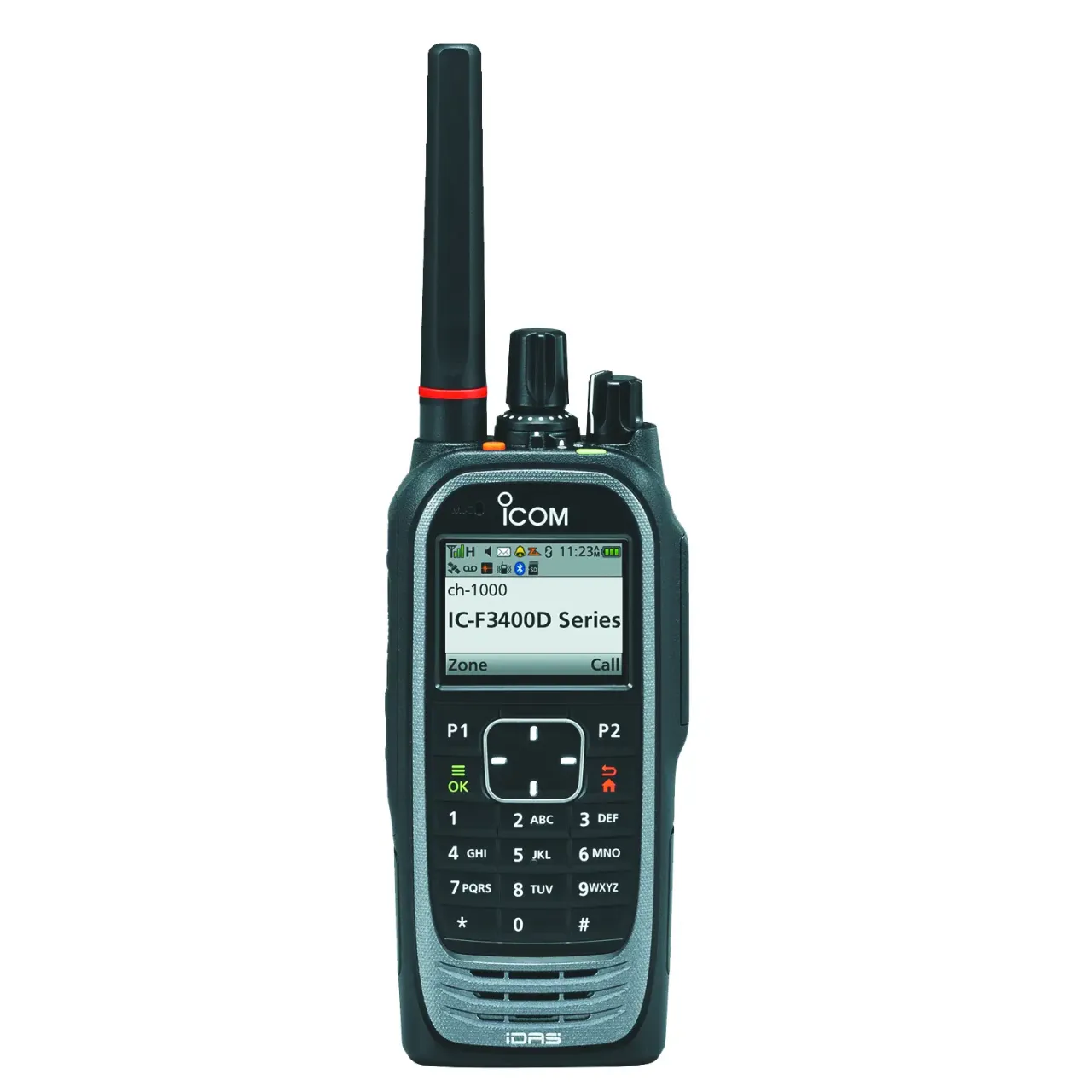
- Icom IDAS™ IC-F3400D / F4400D next-generation digital handhelds
- Alinco DJ-NX40T / Alinco DJ-NX45T compact VHF/UHF handheld supporting NXDN
Note: Some manufacturers advertise radios that “mention” NXDN or appear in NXDN-related searches, such as certain AnyTone or Retevis models. However, as of now, these radios do not implement the NXDN protocol used by Kenwood NEXEDGE® and Icom IDAS™ systems. If you’re looking for true NXDN compatibility for ham radio use, stick to the Kenwood, Icom, or legacy Vertex Standard models listed above.

Many used commercial radios can be re-programmed for ham radio frequencies using manufacturer software or third-party tools. A programming cable and CPS (Customer Programming Software) are essential. When shopping, verify that the firmware version supports NXDN conventional (not trunked) mode.
Programming Your NXDN Radio
Programming NXDN is more similar to commercial radio workflows than DMR. At a high level:
- Open your radio’s CPS and create a new conventional channel.
- Set the frequency pair (or simplex) appropriate for your region and license.
- Choose Mode: NXDN, select bandwidth (12.5 kHz or 6.25 kHz), and assign RX/TX frequencies.
- Disable encryption. In most countries, encryption is not permitted on ham radio bands. Canadian hams may use encryption only if the key and method are published publicly.
- Write the codeplug to your radio and perform an on-air test.
Note: Unlike DMR, NXDN does not require a global Radio ID. If a repeater uses Unit IDs for local user tracking, you can choose any simple number (e.g. 1, 10, 100), but most ham radio NXDN systems don’t require one at all.
In most cases, simplex channels work well for local testing. For repeaters, ensure your shift and access codes (RAN – Radio Access Number) match the system settings.
Pro Tips for New NXDN Users
- Start with simplex to verify audio quality before programming repeater channels.
- Keep your radio’s firmware and CPS updated to the same version.
- Use the correct RAN code – it works like a CTCSS tone for digital systems.
- Remember that NXDN and DMR are not cross-compatible unless bridged by a network gateway.
8 Finding NXDN Repeater Activity
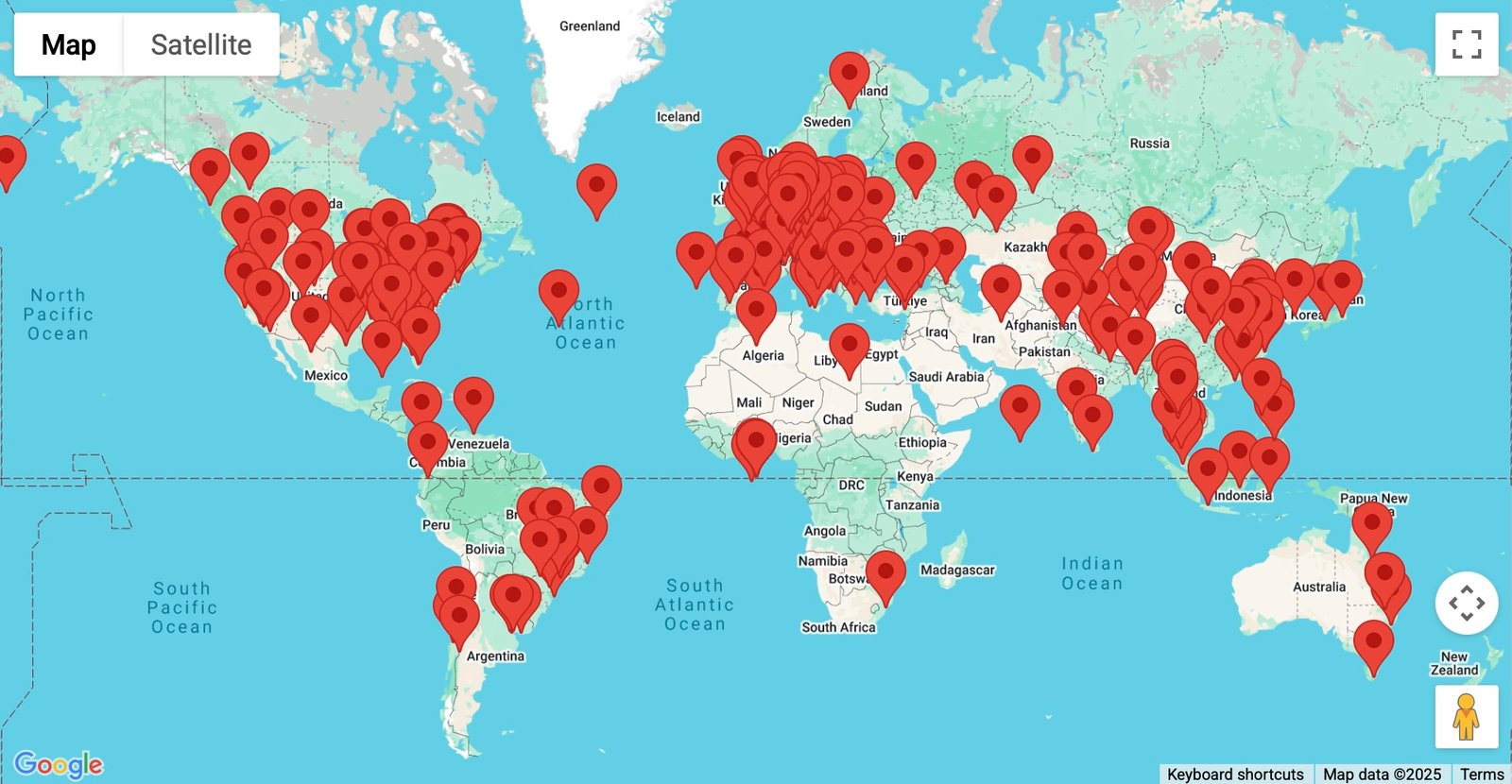
NXDN shares similarities with DMR and P25, but ham radio NXDN repeaters are far less common worldwide – with only about 240–250 repeater systems listed on RepeaterBook. Because of this, coverage can vary significantly by region, though activity is slowly growing as more hams experiment with surplus commercial gear.
To find NXDN systems near you, check online directories such as RepeaterBook or local club websites for “NXDN” listings. You can also view a global map of NXDN repeaters on RadioID.net, which includes both NXDN and mixed-mode systems. Some MMDVM-based hotspots and cross-mode reflectors also support NXDN, allowing you to link into systems even if there are no local repeaters.
In North America, most amateur NXDN activity occurs on mixed-mode repeaters – systems that support NXDN alongside other modes such as FM, P25, or DMR, primarily on the 2m and 70cm bands. Operators in the UK, Australia, and New Zealand can check their regional band plans and repeater directories, as frequency allocations and channel spacing may vary slightly by country.
9 Advantages and Limitations
NXDN offers several technical advantages, but those benefits come with practical limitations that have shaped its adoption in amateur radio.
- Pros: Excellent voice clarity, narrow bandwidth, robust against interference, straightforward setup.
- Cons: Fewer repeaters, proprietary nature, limited open-source software support.
For hams who already own compatible Kenwood or Icom commercial gear, NXDN is an easy entry into digital voice experimentation.
10 Frequently Asked Questions About NXDN
Do I need a Radio ID like DMR to use NXDN?
No. Unlike DMR, NXDN does not use a global Radio ID system. Most ham NXDN repeaters do not require any ID at all, and if a system uses local Unit IDs, you can simply choose a small number (e.g., 1, 10, 100) with no registration needed.
Can NXDN radios talk to DMR radios?
No. They use different digital protocols, though some gateways can bridge the two.
What is a RAN code?
It’s the Radio Access Number – NXDN’s version of a digital access tone, required to access most systems.
Can I use a hotspot for NXDN?
Yes, some MMDVM-based hotspots and cross-mode servers support NXDN, though not all.
Is NXDN better than DMR?
Not necessarily – it depends on local repeater coverage and your operating goals.
Can I use encryption on NXDN as a ham?
In most countries, no – encryption is not permitted on ham radio. This includes the United States, the United Kingdom, Australia, and New Zealand. In Canada, encryption may be used only if the method and key are published publicly, meaning the communication is not intended to obscure its meaning.
11 Continue Learning about NXDN
NXDN occupies a somewhat unique place in amateur radio, blending narrowband digital voice with equipment and concepts that originated in the commercial radio world.
If you’re exploring NXDN for amateur use, curious about compatible radios, simplex or repeater operation, network options, or how NXDN compares to other digital voice modes like DMR or D-STAR, the EvoHam Community offers a place to explore those questions through real-world ham experience.
Visit the EvoHam Community’s NXDN section to see how other hams are approaching the mode, share setup experiences, and learn what works well in amateur radio environments.
12 Final Thoughts
NXDN is a technically sound, spectrum-efficient digital voice mode with a long history in commercial radio and a smaller but dedicated presence in amateur radio. Its limited adoption among hams is not due to poor performance, but rather to infrastructure availability, radio accessibility, and competition from more widely deployed digital voice systems.
For operators who already own NXDN-capable radios, live in areas with active repeaters, or simply want to explore a less common digital mode, NXDN can still be a rewarding option. For others, modes like DMR, D-STAR, or Fusion may offer a lower barrier to entry and broader community support.
Understanding where NXDN fits – and where it doesn’t, is the key to deciding whether it belongs in your own ham radio toolkit.
13 Related Reading on EvoHam
- Fusion for Beginners: A Step-by-Step Guide to Yaesu System Fusion
- DMR for Beginners: A Step-by-Step Guide for New Hams
- M17 for Beginners: A Step-by-Step Guide for New Hams
- P25 for Beginners:Understanding Project 25 Digital Voice
Some links in this story are affiliate links. If you choose to buy through them, EvoHam may earn a small commission – at no extra cost to you. It helps support more stories like this.