• About EvoHam
  • Contact Us
Evoham.com
  • Home
  • News
    • All
    • D-STAR News
    • DMR News
    • Equipment News
    • FreeDV News
    • M17 News
    • Operating News
    • Yaesu Fusion News
    Laptop screen showing the EvoHam.com website open in a web browser, highlighting the site’s launch.

    EvoHam.com Is Live – And We’re Just Getting Started

    Smartphone displaying SmartSDR waterfall and spectrum view, illustrating early FreeDV 2.1.0 SmartSDR support.

    FreeDV 2.1.0 Release Adds SmartSDR Support

    Prototype M17 LinHT Handheld on a test bench connected to RF test equipment during development.

    M17 LinHT Handheld: Open-Source Radio Progress Update

    NEW RADIO, DMR, D-STAR, C4FM, System Fusion, mobile, radio, ham radio, amateur radio, VA3XPR, dual-band, multi-mode, FM, chassis

    New Radio (2016): Multimode Ham Radio for DMR, D-STAR & C4FM

    FreeDV 2.0.2 user interface showing the RADEV1 digital voice modem and live HF signal waterfall.

    FreeDV 2.0.2 Release: Open-Source HF Digital Voice Update

    Jean Moffett, VE3WAD, operating a Digital Mobile Radio (DMR) setup at the Ontario Science Centre amateur radio station, demonstrating the technology to visitors.

    Ontario Science Centre Revolutionizes Ham Radio with DMR

    • DMR News
    • Yaesu Fusion News
    • D-STAR News
    • Equipment News
    • Operating News
    • FreeDV News
    • M17 News
    • P25 News
  • Reviews
    • All
    • DMR Reviews
    • Mobile Radio Reviews
    • P25 Reviews
    • Portable Radio Reviews
    • Yaesu Fusion Reviews
    Hytera PD782 UHF DMR handheld showing colour LCD display and keypad

    Hytera PD782 Review (2025): Rugged Mid-Tier DMR Radio

    Yaesu FT2DR review - dual-band C4FM Fusion handheld radio showing touchscreen display

    Yaesu FT2DR Review (2025): Still Worth It Today?

    TYT MD-380 DMR handheld radio showing its colour LCD display and keypad.

    TYT MD-380 Review (2025): A DMR Classic Revisited

    Front view of the Motorola SL300 DMR radio showing its slim design and matrix LED display.

    Motorola SL300 Review (2025): Pocket-Sized DMR Performance

    Motorola XPR7550 IS DMR handheld radio showing blue Intrinsically Safe housing and colour LCD display

    Motorola XPR7550 IS Review (2025): Intrinsically Safe DMR

    Motorola SL7550 UHF DMR handheld radio showing colour LCD screen and keypad layout

    Motorola SL7550 Review (2025): Ultra-Slim DMR Handheld

    • DMR
    • Yaesu Fusion
    • D-STAR
    • P25
    • NXDN
    • Portable Radios
    • Mobile Radios
    • Hotspots
    • Repeaters
  • Guides
    • All
    • D-STAR Guides
    • DMR Guides
    • Experimental & SDR Radio Guides
    • FreeDV Guides
    • M17 Guides
    • NXDN Guides
    • Operating Guides
    • P25 Guides
    • Repeater Guides
    • TETRA Guides
    • Yaesu Fusion Guides
    NA5B WebSDR interface with HF waterfall display, illustrating what users see when listening to FreeDV using a FreeDV WebSDR. Photo credit: NA5B

    FreeDV WebSDR: Listen to FreeDV Online Without an HF Radio

    Prototype LinHT Linux-based SDR handheld radio displayed with members of the development team. Photo credit: CQ DL / DARC

    LinHT for Beginners: A Linux-Based Experimental SDR Radio

    TETRA for Beginners example of a Motorola MTP8000Ex Series TETRA portable radio used aboard a German navy vessel

    TETRA for Beginners: A Trunked System Adapted for Ham Radio

    Yaesu System Fusion radio being programmed, illustrating ham radio digital voice terminology and digital mode setup

    Ham Radio Digital Voice Terminology Explained for Beginners

    HF radio displaying an SSB spectrum, used for operating FreeDV Frequencies on amateur HF bands. U.S. Air Force photo by Airman 1st Class Omari Bernard.

    FreeDV Frequencies (HF): Where to Call on 20m, 40m & 80m

    Yaesu FT-950 HF transceiver tuned for digital voice operation using FreeDV, shown as the hero image for the FreeDV for Beginners guide.

    FreeDV for Beginners: How to Use Digital Voice on HF

    • DMR Guides
    • FreeDV Guides
    • Operating Guides
    • YAESU FUSION
    • D-STAR
    • P25
    • M17 Guides
    • NXDN
    • Destination Guides
    • Repeater Guides
    • Software & Programming Guides
  • Resources
    • All
    • DMR Resources
    • Firmware Resources
    • FreeDV Resources
    • Mapping Software
    • Programming Software Resources
    • RF Tools
    • Simplex Frequency Resources
    HF radio displaying an SSB spectrum, used for operating FreeDV Frequencies on amateur HF bands. U.S. Air Force photo by Airman 1st Class Omari Bernard.

    FreeDV Frequencies (HF): Where to Call on 20m, 40m & 80m

    Baofeng DM32UV and AnyTone AT-D878UVII Plus handheld radios beside a laptop running DMR Programming Software.

    DMR Programming Software and Firmware for Ham Radios

    Hytera TD580 DMR handheld radio showing 441.000 MHz DMR simplex frequency on its display for ham radio use.

    DMR Simplex Frequencies Explained: CCs, Talkgroups & Use

    RF coverage map showing predicted signal strength and coverage area from a central transmitter location created with Radio Mobile Online.

    How to Create RF Coverage Maps Using Radio Mobile

    • DMR Resources
    • Yaesu Fusion Resources
    • D-STAR Resources
    • NXDN Resources
    • P25 Resources
  • Editorial
    A laptop showing the EvoHam Community ham radio digital voice forum with categories for FreeDV, DMR and Yaesu System Fusion.

    Join the EvoHam Community: A Ham Radio Digital Voice Forum

    International Space Station orbiting above Earth at sunrise, illustrating the context for the ISS digital voice discussion. Photo by ESA.

    ISS Digital Voice: Why It Isn’t Here Yet – and What’s Next

    Digital voice handheld radio sitting on top of the original Radio Amateur’s Code document.

    The Modern Radio Amateur’s Code

    Don Trynor VA3XFT working on EvoHam ham radio digital voice content at a laptop with a DMR handheld radio on the table.

    Why EvoHam Exists – A New Home for Ham Radio Digital Voice

  • Community
No Result
View All Result
  • Home
  • News
    • All
    • D-STAR News
    • DMR News
    • Equipment News
    • FreeDV News
    • M17 News
    • Operating News
    • Yaesu Fusion News
    Laptop screen showing the EvoHam.com website open in a web browser, highlighting the site’s launch.

    EvoHam.com Is Live – And We’re Just Getting Started

    Smartphone displaying SmartSDR waterfall and spectrum view, illustrating early FreeDV 2.1.0 SmartSDR support.

    FreeDV 2.1.0 Release Adds SmartSDR Support

    Prototype M17 LinHT Handheld on a test bench connected to RF test equipment during development.

    M17 LinHT Handheld: Open-Source Radio Progress Update

    NEW RADIO, DMR, D-STAR, C4FM, System Fusion, mobile, radio, ham radio, amateur radio, VA3XPR, dual-band, multi-mode, FM, chassis

    New Radio (2016): Multimode Ham Radio for DMR, D-STAR & C4FM

    FreeDV 2.0.2 user interface showing the RADEV1 digital voice modem and live HF signal waterfall.

    FreeDV 2.0.2 Release: Open-Source HF Digital Voice Update

    Jean Moffett, VE3WAD, operating a Digital Mobile Radio (DMR) setup at the Ontario Science Centre amateur radio station, demonstrating the technology to visitors.

    Ontario Science Centre Revolutionizes Ham Radio with DMR

    • DMR News
    • Yaesu Fusion News
    • D-STAR News
    • Equipment News
    • Operating News
    • FreeDV News
    • M17 News
    • P25 News
  • Reviews
    • All
    • DMR Reviews
    • Mobile Radio Reviews
    • P25 Reviews
    • Portable Radio Reviews
    • Yaesu Fusion Reviews
    Hytera PD782 UHF DMR handheld showing colour LCD display and keypad

    Hytera PD782 Review (2025): Rugged Mid-Tier DMR Radio

    Yaesu FT2DR review - dual-band C4FM Fusion handheld radio showing touchscreen display

    Yaesu FT2DR Review (2025): Still Worth It Today?

    TYT MD-380 DMR handheld radio showing its colour LCD display and keypad.

    TYT MD-380 Review (2025): A DMR Classic Revisited

    Front view of the Motorola SL300 DMR radio showing its slim design and matrix LED display.

    Motorola SL300 Review (2025): Pocket-Sized DMR Performance

    Motorola XPR7550 IS DMR handheld radio showing blue Intrinsically Safe housing and colour LCD display

    Motorola XPR7550 IS Review (2025): Intrinsically Safe DMR

    Motorola SL7550 UHF DMR handheld radio showing colour LCD screen and keypad layout

    Motorola SL7550 Review (2025): Ultra-Slim DMR Handheld

    • DMR
    • Yaesu Fusion
    • D-STAR
    • P25
    • NXDN
    • Portable Radios
    • Mobile Radios
    • Hotspots
    • Repeaters
  • Guides
    • All
    • D-STAR Guides
    • DMR Guides
    • Experimental & SDR Radio Guides
    • FreeDV Guides
    • M17 Guides
    • NXDN Guides
    • Operating Guides
    • P25 Guides
    • Repeater Guides
    • TETRA Guides
    • Yaesu Fusion Guides
    NA5B WebSDR interface with HF waterfall display, illustrating what users see when listening to FreeDV using a FreeDV WebSDR. Photo credit: NA5B

    FreeDV WebSDR: Listen to FreeDV Online Without an HF Radio

    Prototype LinHT Linux-based SDR handheld radio displayed with members of the development team. Photo credit: CQ DL / DARC

    LinHT for Beginners: A Linux-Based Experimental SDR Radio

    TETRA for Beginners example of a Motorola MTP8000Ex Series TETRA portable radio used aboard a German navy vessel

    TETRA for Beginners: A Trunked System Adapted for Ham Radio

    Yaesu System Fusion radio being programmed, illustrating ham radio digital voice terminology and digital mode setup

    Ham Radio Digital Voice Terminology Explained for Beginners

    HF radio displaying an SSB spectrum, used for operating FreeDV Frequencies on amateur HF bands. U.S. Air Force photo by Airman 1st Class Omari Bernard.

    FreeDV Frequencies (HF): Where to Call on 20m, 40m & 80m

    Yaesu FT-950 HF transceiver tuned for digital voice operation using FreeDV, shown as the hero image for the FreeDV for Beginners guide.

    FreeDV for Beginners: How to Use Digital Voice on HF

    • DMR Guides
    • FreeDV Guides
    • Operating Guides
    • YAESU FUSION
    • D-STAR
    • P25
    • M17 Guides
    • NXDN
    • Destination Guides
    • Repeater Guides
    • Software & Programming Guides
  • Resources
    • All
    • DMR Resources
    • Firmware Resources
    • FreeDV Resources
    • Mapping Software
    • Programming Software Resources
    • RF Tools
    • Simplex Frequency Resources
    HF radio displaying an SSB spectrum, used for operating FreeDV Frequencies on amateur HF bands. U.S. Air Force photo by Airman 1st Class Omari Bernard.

    FreeDV Frequencies (HF): Where to Call on 20m, 40m & 80m

    Baofeng DM32UV and AnyTone AT-D878UVII Plus handheld radios beside a laptop running DMR Programming Software.

    DMR Programming Software and Firmware for Ham Radios

    Hytera TD580 DMR handheld radio showing 441.000 MHz DMR simplex frequency on its display for ham radio use.

    DMR Simplex Frequencies Explained: CCs, Talkgroups & Use

    RF coverage map showing predicted signal strength and coverage area from a central transmitter location created with Radio Mobile Online.

    How to Create RF Coverage Maps Using Radio Mobile

    • DMR Resources
    • Yaesu Fusion Resources
    • D-STAR Resources
    • NXDN Resources
    • P25 Resources
  • Editorial
    A laptop showing the EvoHam Community ham radio digital voice forum with categories for FreeDV, DMR and Yaesu System Fusion.

    Join the EvoHam Community: A Ham Radio Digital Voice Forum

    International Space Station orbiting above Earth at sunrise, illustrating the context for the ISS digital voice discussion. Photo by ESA.

    ISS Digital Voice: Why It Isn’t Here Yet – and What’s Next

    Digital voice handheld radio sitting on top of the original Radio Amateur’s Code document.

    The Modern Radio Amateur’s Code

    Don Trynor VA3XFT working on EvoHam ham radio digital voice content at a laptop with a DMR handheld radio on the table.

    Why EvoHam Exists – A New Home for Ham Radio Digital Voice

  • Community
No Result
View All Result
EvoHam
No Result
View All Result
Home Guides Operating Guides
Yaesu System Fusion radio being programmed, illustrating ham radio digital voice terminology and digital mode setup

Programming a Yaesu System Fusion radio, where newcomers encounter key ham radio digital voice terminology such as modes, digital squelch, and networked operation. Photo credit: Yaesu.

Ham Radio Digital Voice Terminology Explained for Beginners

A clear, beginner-friendly guide to the language behind DMR, Yaesu Fusion, D-STAR, NXDN, P25, M17, and FreeDV

Don Trynor, VA3XFT by Don Trynor, VA3XFT
December 19, 2025
Share on FacebookShare on TwitterShare on LinkedInShare on RedditShare on ThreadsShare on WhatsApp

Table of Contents

  • 1. Why Ham Radio Digital Voice Terminology Exists
  • 2. Codecs: Why Digital Voice Sounds the Way It Does
  • 3. How Digital Voice Shares the Radio Spectrum
  • 4. BER: The Digital “Signal Strength” Nobody Mentions at First
  • 5. Timeslots: How One Frequency Handles Two Conversations
  • 6. Talkgroups: The “Rooms” Where Conversations Happen
  • 7. Access Parameters: Color Codes, RAN, and NAC
  • 8. Reflectors and Gateways: How Local Repeaters Become Global Networks
  • 9. IDs: Why Digital Voice Needs Numbers, Not Just Callsigns
  • 10. Programming Radios: The World of CPS and Codeplugs
  • 11. Hotspots: The Personal Doorway to Digital Voice
  • 12. Putting It All Together: A Newcomer’s First Digital QSO
  • 13. Where to Go Next

Digital voice has a reputation for being “complicated”, but that’s only because it introduces a few new ideas that analog FM never needed words for. Once you understand those ideas, and the ham radio digital voice terminology that goes with them, the entire digital landscape becomes surprisingly intuitive.

Every ham who has ever tried DMR, Yaesu Fusion, D-STAR, NXDN, P25, M17, or FreeDV has gone through the same first impression:

“This is cool… but why does everyone talk in a different language?”

This guide is here to translate that language into something friendly, clear, and practical. No engineering degree. No alphabet soup. Just a real-world explanation of what newcomers actually need to know, and why it matters.

Let’s walk through the digital voice world step by step.

1 Why Ham Radio Digital Voice Terminology Exists

When you speak on analog FM, your voice travels as a continuous waveform. Digital voice does something different: your speech becomes data. The radio samples your audio, compresses it, adds error correction, and transmits the result in structured packets.

That extra structure comes with extra vocabulary. Digital systems need to describe things like:

  • How your voice is packaged
  • How repeaters can carry multiple conversations
  • How networks route signals worldwide
  • How the radio knows who is calling whom

The terms don’t exist because digital is complicated. They exist because digital does more.

Think of analog FM as a simple walkie-talkie. Digital is the walkie-talkie plus a router, a telephone switchboard, and a tiny computer – except all of that is invisible unless you know what to look for.

2 Codecs: Why Digital Voice Sounds the Way It Does

Your first digital QSO teaches you about codecs – often without you realizing it. One moment you sound crisp and clear; the next you sound like a video game character from 1998. That isn’t the repeater or the Internet – it’s the codec at work.

A codec (COder/DECoder) is the software that compresses your voice so it fits into a very small digital stream. You don’t hear the compression directly; you only hear its effects.
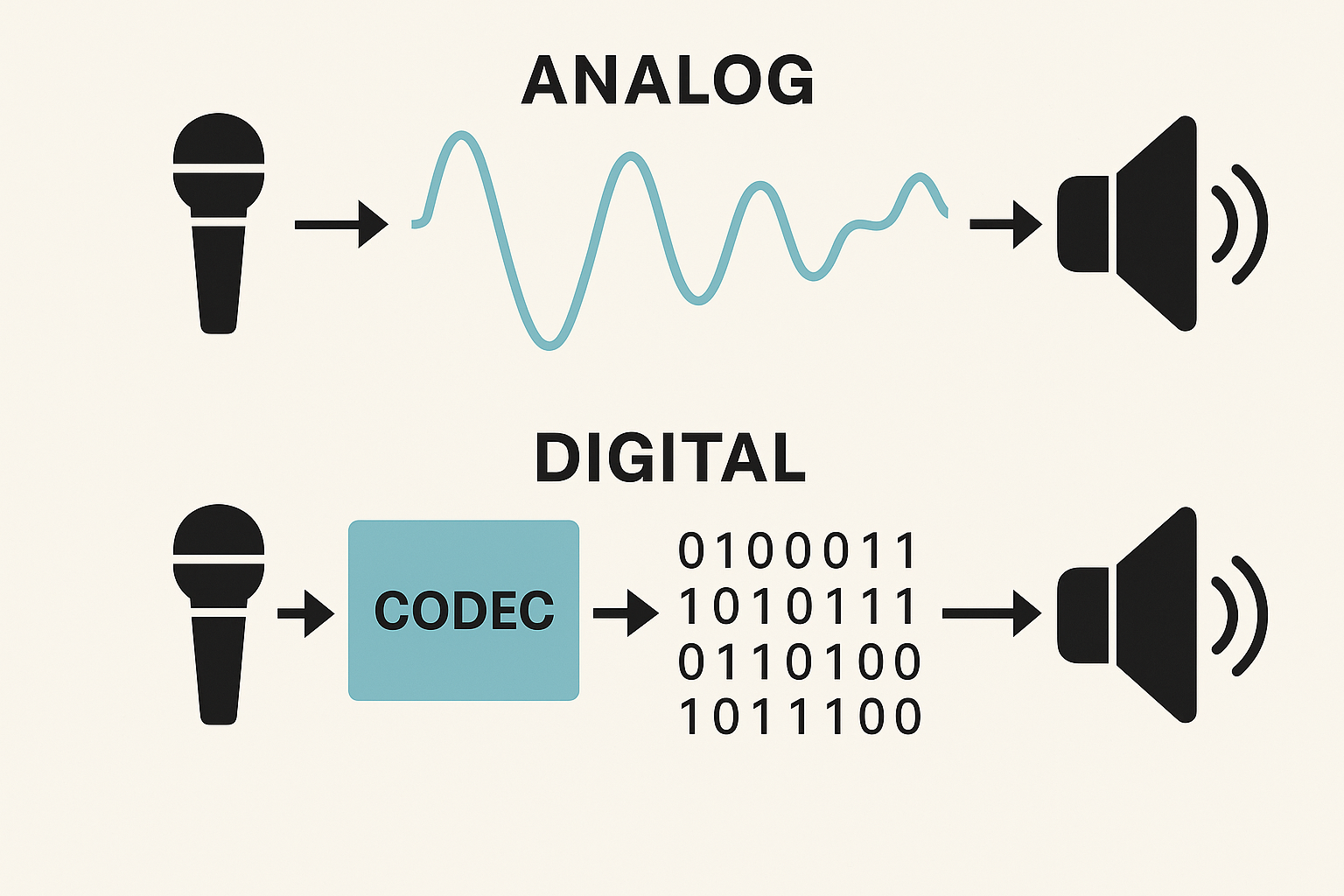
Diagram showing analog voice traveling directly as a smooth waveform from microphone to speaker, versus digital voice going through a codec, converted to binary data, and then played through the speaker.
Illustration comparing how analog voice is sent as a smooth audio waveform, while digital voice is first compressed by a codec into binary data before being transmitted and played back through the speaker.

In digital voice, you’ll also hear the term vocoder. A vocoder is the part of the codec that specifically analyzes and reconstructs human speech. In other words, all vocoders are used inside codecs, but not all codecs are vocoders.

Digital voice systems use vocoders because human speech follows predictable patterns. By focusing only on those patterns and ignoring everything else, the radio can send intelligible voice using very little bandwidth.

Here’s an easy way to visualize this process.

Imagine describing a painting to someone in 10 seconds. You wouldn’t describe every brush stroke. You’d focus on the important details and trust the listener to reconstruct the image in their mind. That’s exactly what a codec – and its vocoder, does with your voice.

Different digital voice modes use different vocoders as part of their overall codec design:

  • DMR, Yaesu Fusion, D-STAR, NXDN, and P25 use variants of the AMBE vocoder.
  • M17 and FreeDV use Codec2, a fully open-source vocoder and codec.

You don’t need to become an expert in codecs or vocoders. You only need to recognize that they explain why digital voice sounds different—sometimes beautifully clean, sometimes slightly robotic, and sometimes like a modem in distress.

3 How Digital Voice Shares the Radio Spectrum

Once your voice has been converted into digital data, the next challenge is getting that data onto the air efficiently. Radio spectrum is limited, and digital voice systems have developed different ways to share it without users interfering with each other.

These methods describe how multiple signals occupy the same frequency space. You’ll often hear them referred to by acronyms such as TDMA, FDMA, or C4FM.

FDMA (Frequency-Division Multiple Access) assigns each signal its own slice of spectrum. Each transmission occupies a single channel at a time, much like analog FM. This approach is straightforward and is used by several digital voice modes, including D-STAR, Yaesu Fusion, P25 Phase 1, NXDN, M17, and FreeDV, because it behaves in a familiar, analog FM-like way on the air.

TDMA (Time-Division Multiple Access) takes a different approach. Instead of dividing the frequency, it divides time. Multiple signals share the same frequency by transmitting in rapid, alternating timeslots. In amateur radio, DMR is the most common TDMA-based digital voice mode, with P25 Phase 2 also using this approach. TETRA, a professional digital radio standard that some hams experiment with, is also TDMA-based.
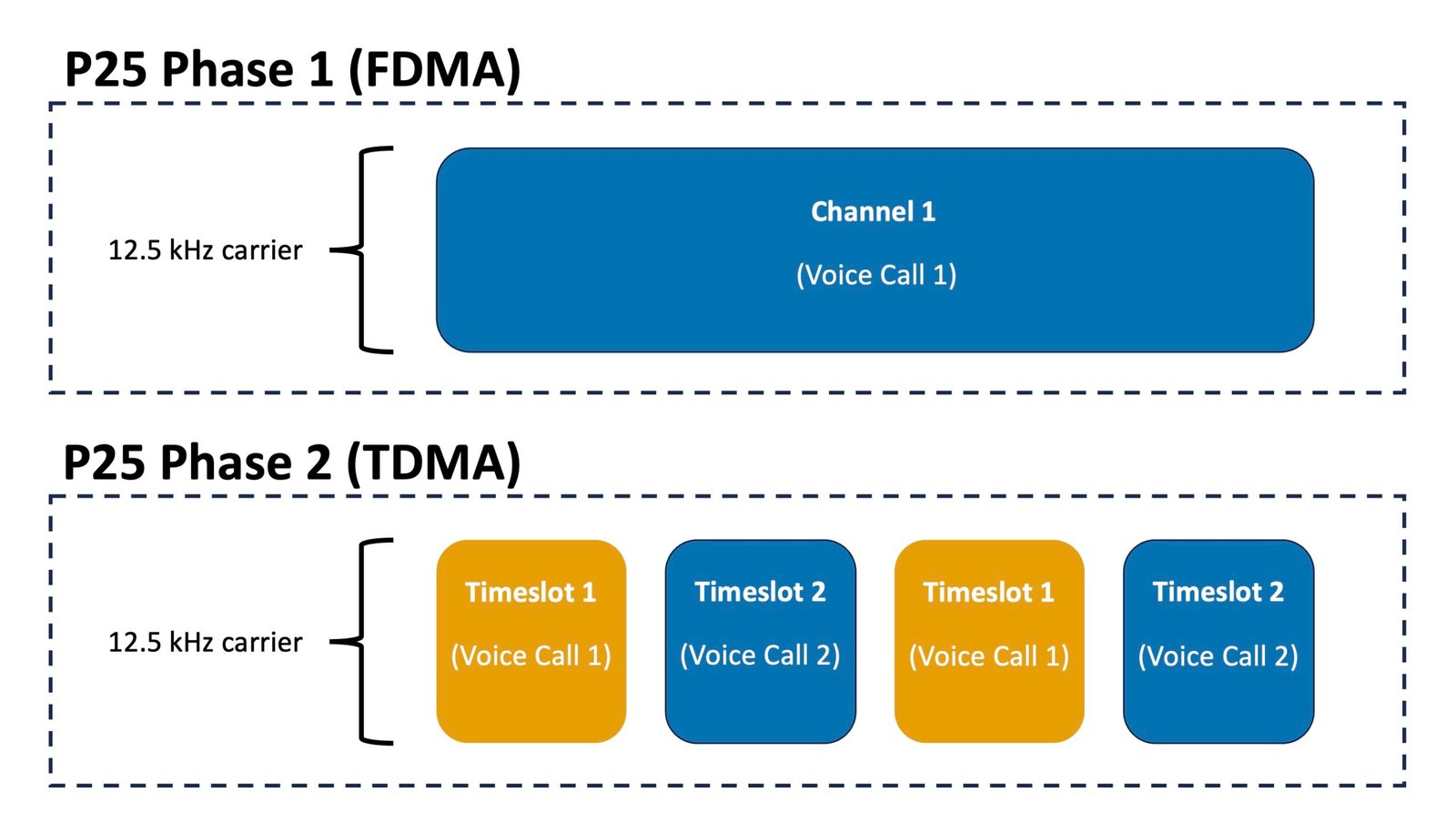
Diagram showing P25 Phase 1 FDMA and Phase 2 TDMA channel structures - featured in P25 for Beginners guide
Diagram comparing P25 Phase 1 (FDMA) and Phase 2 (TDMA). Phase 1 uses a single 12.5 kHz channel for one digital voice call, while Phase 2 splits the same bandwidth into two alternating time slots to carry two simultaneous calls.

DMR is the most familiar ham-radio example of TDMA. By dividing a single 12.5 kHz channel into two timeslots, a DMR repeater can support two simultaneous conversations on the same frequency.

You’ll also encounter terms like C4FM, which describe the modulation method used to place digital data onto the RF signal. C4FM is used by Yaesu System Fusion and behaves in a way that feels familiar to analog FM operators, which is one reason Yaesu Fusion is often considered approachable for newcomers.

These techniques don’t change what you say – they change how your digital voice signal fits into the available spectrum. Understanding this helps explain why some systems support more users, why certain modes are not compatible with others, and why features like timeslots exist.

4 BER: The Digital “Signal Strength” Nobody Mentions at First

In the analog world, poor signals show themselves slowly: a little hiss, a little static, fading in and out. Digital voice behaves differently. It sounds perfect… and then suddenly it doesn’t.

That’s because digital voice doesn’t degrade smoothly. It fails when too many bits arrive corrupted.

BER (Bit Error Rate) tells you how many bits are arriving wrong. A low BER means your audio arrives almost perfectly. A high BER means your radio is missing too many puzzle pieces to rebuild your voice.

Most hams understand BER instinctively after a few contacts:

  • Below ~2% → great digital audio
  • Around ~4% → choppy edges
  • Above ~6% → robotic, broken speech
  • Around ~8% → unintelligible

Once you know what BER is, digital voice becomes a lot less mysterious. If your audio falls apart, it isn’t your radio – it’s just too many missing pieces.

5 Timeslots: How One Frequency Handles Two Conversations

Earlier, we introduced TDMA as a way digital voice systems share a single frequency by dividing transmissions across time. In DMR, this concept appears in a very practical form: timeslots.

A DMR repeater uses TDMA to divide one 12.5 kHz channel into two alternating time slices, commonly called Timeslot 1 (TS1) and Timeslot 2 (TS2). These timeslots act like two lanes on the same highway. Both carry traffic, but because they take turns at high speed, the conversations never collide.

Diagram showing DMR timeslot 1 and timeslot 2 alternating on a single frequency in ham radio digital voice terminology
Diagram illustrating how DMR uses two alternating timeslots on a single frequency, a core concept in ham radio digital voice terminology. Photo credit: DMR Association.

The result is that a single DMR repeater can support two completely independent QSOs at the same time. Operators are sharing the same RF channel, but they are separated in time rather than by frequency.

For many newcomers, this is the moment when digital voice finally “clicks.” It isn’t magic or Internet trickery – it’s simply very fast, precisely timed switching that your radio and the repeater handle automatically.

As an operator, you don’t manage the timing itself. You only select the appropriate timeslot when programming or operating your radio, and the system takes care of the rest.

6 Talkgroups: The “Rooms” Where Conversations Happen

Once beginners understand codecs, BER and timeslots, the next question appears almost immediately:

“Why do digital radios have talkgroups instead of just frequencies?”

A talkgroup is simply a virtual meeting room. Instead of one frequency equating to one conversation (the analog model), digital allows a single repeater or hotspot to host many separate conversations at the same time – each in its own talkgroup.

BrandMeister DMR talkgroup list showing global and regional talkgroups used in ham radio digital voice terminology
A partial list of DMR talkgroups available on the BrandMeister network, illustrating how conversations are organized using ham radio digital voice terminology. Photo credit: Brandmeister Network.

Talkgroups keep the digital world organized by separating traffic into “channels” that can be shared across:

  • Local repeaters
  • Regional networks
  • National systems
  • Or worldwide clusters of repeaters and hotspots

So instead of tuning frequencies, you choose the room you want to walk into. For example:

  • A nation-wide talkgroup brings together hams across the country
  • A worldwide talkgroup feels like stepping into a busy international airport lounge
  • A local talkgroup keeps things close to home

Understanding talkgroups is half the battle with DMR and our DMR for Beginners guide expands on this in detail.

7 Access Parameters: Color Codes, RAN, and NAC

Digital systems need to know which signals belong to which repeaters. Analog FM uses CTCSS or PL tones for this. Digital voice uses simple numeric access parameters:

  • DMR uses Color Codes.
  • NXDN uses a RAN (Radio Access Number).
  • P25 uses a NAC (Network Access Code).

Think of these as digital “keys to the door”. If you don’t have the right key, you can’t open the repeater.

These values don’t change the way your audio sounds; they simply control who gets in and who doesn’t.

8 Reflectors and Gateways: How Local Repeaters Become Global Networks

Digital repeaters are more than repeaters – they’re network devices. Many of them connect to remote servers called reflectors or digital networks that act as meeting points for multiple systems.

Gateways connect the RF repeater to a particular network. Reflectors act like shared gathering spaces within those networks.
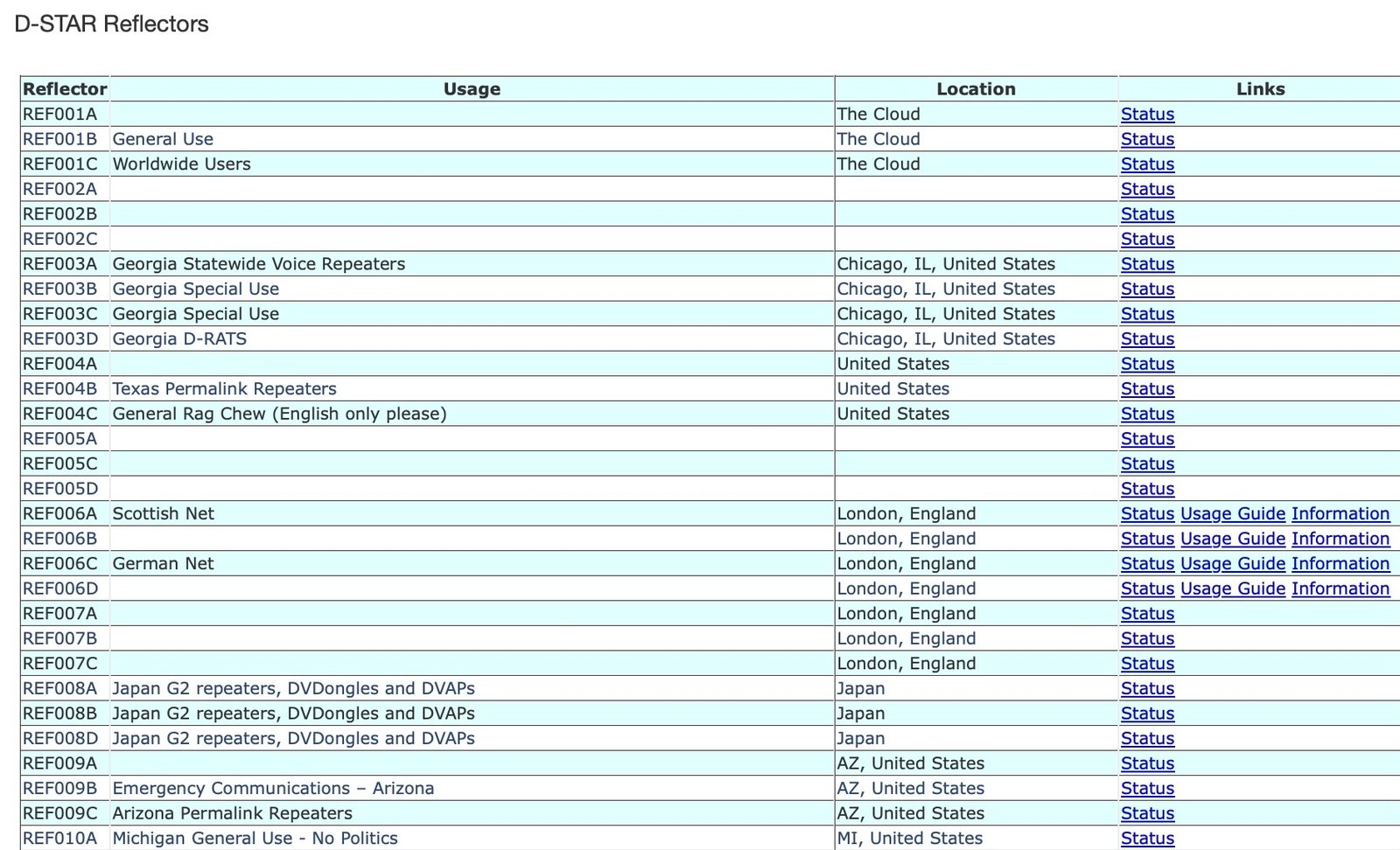
D-STAR for Beginners - screenshot of D-STAR reflector list from DSTARInfo.com showing worldwide and regional digital voice reflectors.
A snapshot from DSTARInfo.com showing active D-STAR reflectors around the world – including popular ones like REF001C for worldwide users and REF030C for North America – featured in our D-STAR for Beginners guide.

Together, gateways and reflectors allow a repeater in Halifax, a hotspot in Vancouver, and a Yaesu Fusion box in California to all participate in the same shared conversation.

It feels like magic, but it’s just digital routing behind the scenes.

9 IDs: Why Digital Voice Needs Numbers, Not Just Callsigns

Digital networks require a consistent way to identify users, so most modes rely on the DMR ID system – even modes that aren’t technically DMR.

Your callsign remains your identity on the air. Your DMR ID is simply the network’s version of your callsign in numeric form.
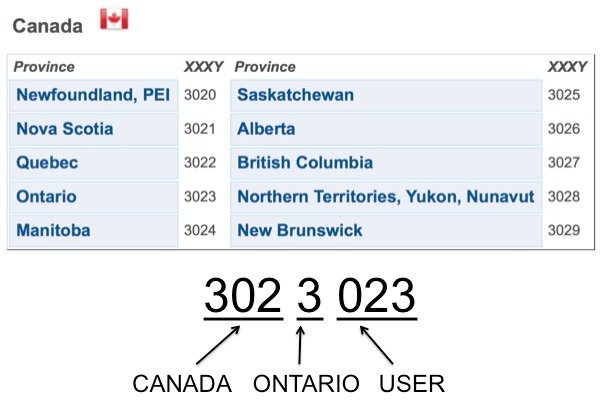
DMR for Beginners - infographic illustrating the structure of a DMR ID with country, region, and user digits for Canadian provinces
Infographic showing how a DMR ID is structured – an essential step explained in our DMR for Beginners guide for new ham-radio operators.

It allows systems to:

  • Route traffic correctly,
  • log activity,
  • avoid collisions,
  • and match your radio to your callsign automatically.

Not all digital voice modes handle identification in exactly the same way. DMR, NXDN, P25, and TETRA require a numeric ID for proper routing on their networks. Other modes, such as D-STAR, Yaesu Fusion, FreeDV, and M17, use your callsign directly as the primary form of identification, even when operating through repeaters, reflectors, or hotspots.

For digital voice modes that require a numeric ID, you only need one, obtained from RadioID.net.

10 Programming Radios: The World of CPS and Codeplugs

Unlike analog radios – where you twist a knob and you’re done, digital radios rely on structured programming.

The software used for this is called CPS (Customer Programming Software). It creates the entire configuration of your radio, including:

  • Channel names and frequencies
  • Talkgroups
  • Timeslots
  • Access parameters (e.g., color codes, NAC, RAN)
  • Zones
  • Button functions
  • Hotspot profiles

In DMR, this entire configuration is called a codeplug and it’s essentially your radio’s personality. A well-designed codeplug makes digital radio feel effortless. A sloppy one can make even simple things feel confusing.

11 Hotspots: The Personal Doorway to Digital Voice

Even if you live far from a digital voice repeater, a hotspot brings the entire world to your desk. These small devices connect to your Wi-Fi and bridge your handheld digital radio to digital networks.

Radioddity RHS-H1 digital voice hotspot used for learning ham radio digital voice terminology and networked operation
A Radioddity RHS-H1 digital voice hotspot, commonly used by hams to explore and understand ham radio digital voice terminology such as talkgroups, timeslots, IDs, and networked operation. Photo credit: Radioddity.

Hotspots support many modes – DMR, Yaesu Fusion, D-STAR, NXDN, P25, M17, often with cross-mode options. They’re compact, personal, and customizable, and they eliminate the biggest barrier to digital voice: geographic access.

Most newcomers find hotspots to be the easiest, most forgiving way to explore digital voice.

12 Putting It All Together: A Newcomer’s First Digital QSO

Once you grasp the basic terminology, here’s how a typical digital QSO might work:

You program your radio using CPS, enter your DMR ID, define talkgroups, and save everything into your codeplug. You key up your hotspot on a national talkgroup – say, Canada-wide, and watch your BER hover around 1%. A clear voice answers you instantly.

Later, you switch to your local DMR repeater, choose a talkgroup on timeslot 2, and join a regional net. That same evening you hop into a Yaesu Fusion reflector from your phone’s hotspot, or maybe you experiment with FreeDV on HF.

Each system feels different, but the underlying vocabulary – the codec shaping your voice, the talkgroup organizing the conversation, the reflector linking systems together, now feels familiar.

Digital voice stops being confusing and starts becoming fun.

13 Where to Go Next

For deeper learning and mode-specific explanations, explore:

  • DMR for Beginners
  • Yaesu Fusion for Beginners
  • D-STAR for Beginners
  • NXDN for Beginners
  • P25 for Beginners
  • M17 for Beginners
  • FreeDV for Beginners


Some links in this story are affiliate links. If you choose to buy through them, EvoHam may earn a small commission – at no extra cost to you. It helps support more stories like this.

Tags: BeginnerD-STARDMRFreeDVNXDNP25RadioID.netYaesu Fusion
Don Trynor, VA3XFT

Don Trynor, VA3XFT

A licensed amateur radio operator since 1988, Don brings over 15 years of professional experience in telecommunications. A lifelong digital communications enthusiast, he channels that passion into EvoHam.com - a site dedicated to digital voice technologies in amateur radio. When he’s not testing new radios, Don enjoys hiking, kayaking, and exploring the science behind the world’s wonders.

Related Posts

NA5B WebSDR interface with HF waterfall display, illustrating what users see when listening to FreeDV using a FreeDV WebSDR. Photo credit: NA5B
FreeDV Guides

FreeDV WebSDR: Listen to FreeDV Online Without an HF Radio

January 8, 2026
TETRA for Beginners example of a Motorola MTP8000Ex Series TETRA portable radio used aboard a German navy vessel
TETRA Guides

TETRA for Beginners: A Trunked System Adapted for Ham Radio

January 13, 2026
HF radio displaying an SSB spectrum, used for operating FreeDV Frequencies on amateur HF bands. U.S. Air Force photo by Airman 1st Class Omari Bernard.
FreeDV Guides

FreeDV Frequencies (HF): Where to Call on 20m, 40m & 80m

January 8, 2026
Yaesu FT-950 HF transceiver tuned for digital voice operation using FreeDV, shown as the hero image for the FreeDV for Beginners guide.
FreeDV Guides

FreeDV for Beginners: How to Use Digital Voice on HF

January 13, 2026
Next Post
TETRA for Beginners example of a Motorola MTP8000Ex Series TETRA portable radio used aboard a German navy vessel

TETRA for Beginners: A Trunked System Adapted for Ham Radio

Popular Posts

Baofeng DM32UV and AnyTone AT-D878UVII Plus handheld radios beside a laptop running DMR Programming Software.

DMR Programming Software and Firmware for Ham Radios

January 8, 2026
Prototype LinHT Linux-based SDR handheld radio displayed with members of the development team. Photo credit: CQ DL / DARC

LinHT for Beginners: A Linux-Based Experimental SDR Radio

January 14, 2026
Yaesu FT-950 HF transceiver tuned for digital voice operation using FreeDV, shown as the hero image for the FreeDV for Beginners guide.

FreeDV for Beginners: How to Use Digital Voice on HF

January 13, 2026
Laptop screen showing the EvoHam.com website open in a web browser, highlighting the site’s launch.

EvoHam.com Is Live – And We’re Just Getting Started

November 20, 2025

Follow EvoHam

Join the EvoHam Community

Compare notes, ask questions, and learn how other hams are using FreeDV, DMR, Yaesu Fusion, D-STAR, M17 & more.

Explore the Community

A calm place to learn digital voice in amateur radio.

Join 2,000+ Hams on Facebook

EvoHam

EvoHam offers clear, practical guides, reviews, and resources for modern amateur radio - covering DMR, Yaesu Fusion, D-STAR, P25, NXDN, M17, FreeDV, and other digital voice modes. Everything you need, all in one trusted place.

FOLLOW US

ARCHIVE

  • January 2026
  • December 2025
  • November 2025
  • October 2025
  • September 2025
  • February 2025
  • December 2024

LATEST UPDATES

  • Join the EvoHam Community: A Ham Radio Digital Voice Forum
  • FreeDV WebSDR: Listen to FreeDV Online Without an HF Radio
  • LinHT for Beginners: A Linux-Based Experimental SDR Radio
  • TETRA for Beginners: A Trunked System Adapted for Ham Radio
  • About EvoHam
  • Contact
  • Privacy Policy
  • Affiliate Disclosure
  • Terms of Service

Copyright © 2026 EvoHam. All rights reserved.

No Result
View All Result
  • Home
  • News
    • DMR News
    • Yaesu Fusion News
    • D-STAR News
    • Equipment News
    • Operating News
    • FreeDV News
    • M17 News
    • P25 News
  • Reviews
    • DMR
    • Yaesu Fusion
    • D-STAR
    • P25
    • NXDN
    • Portable Radios
    • Mobile Radios
    • Hotspots
    • Repeaters
  • Guides
    • DMR Guides
    • FreeDV Guides
    • Operating Guides
    • YAESU FUSION
    • D-STAR
    • P25
    • M17 Guides
    • NXDN
    • Destination Guides
    • Repeater Guides
    • Software & Programming Guides
  • Resources
    • DMR Resources
    • Yaesu Fusion Resources
    • D-STAR Resources
    • NXDN Resources
    • P25 Resources
  • Editorial
  • Community

Copyright © 2026 EvoHam. All rights reserved.