



This article was originally published in 2014 and has been updated for clarity, relevance, and accuracy.
Introduction
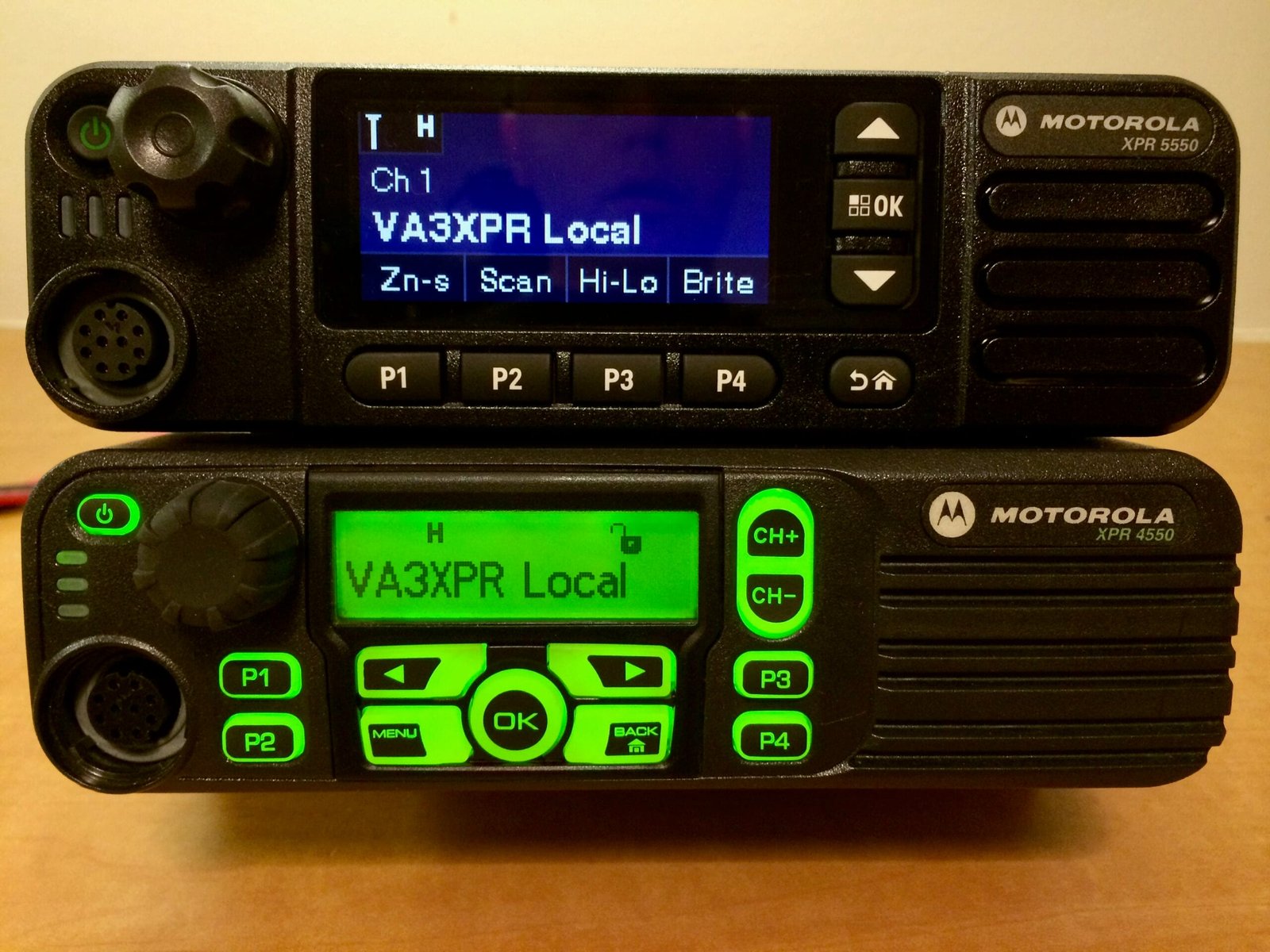
Back in 2014, the Motorola MOTOTRBO XPR 5550 garnered substantial attention from both commercial and amateur radio users for its robust feature set, digital capabilities, and sleek design. This radio was introduced as an upgrade to the XPR 4550, bringing improvements such as enhanced audio, a more powerful CPU, a vivid color display, and broader trunking capabilities. At the time, the amateur radio community was still coming to terms with the shift toward digital voice protocols, and the XPR 5550 offered a professional, dependable gateway into the world of DMR (Digital Mobile Radio).
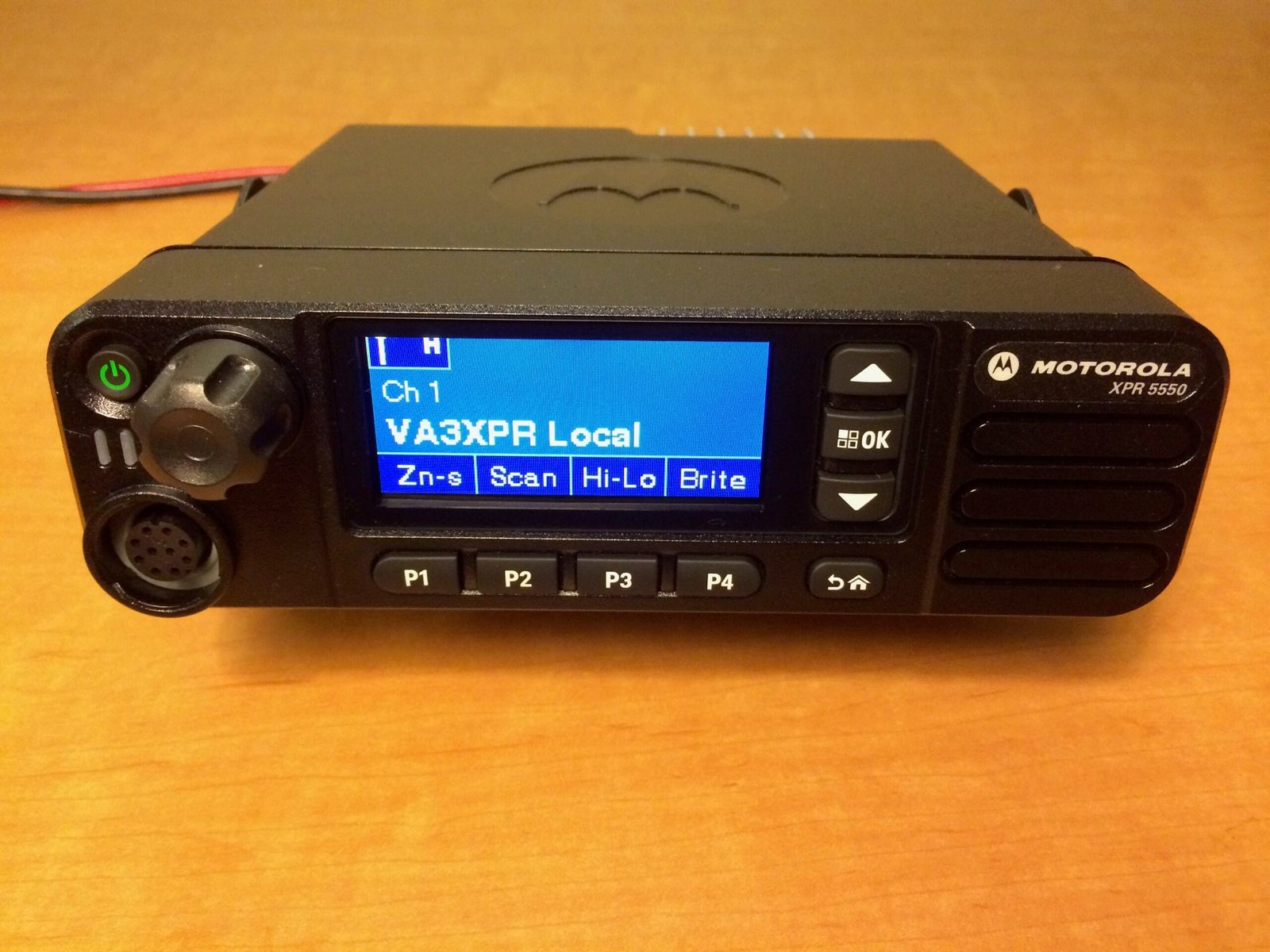
Now, several years later, the XPR 5550 remains a popular choice for hams seeking a reliable mobile radio for both analog and digital operation. Although it was originally designed for commercial and professional use, many amateur radio operators have found that the radio’s durability, excellent audio quality, and integrated digital features make it a valuable addition to their radio lineup. In this updated review, we will revisit the XPR 5550, explore its modern-day relevance in amateur radio, and discuss how to get the most out of it in 2024 and beyond.
Key Features and Specifications
Frequency Bands and Channel Capacity
The XPR 5550 is available in both VHF (136–174 MHz) and UHF (403–470 MHz) bands, making it versatile for a wide range of ham frequencies. It supports up to 1,000 channels, which is significantly useful for amateurs who frequently switch between multiple local repeaters, simplex channels, and DMR talkgroups.
Digital and Analog Operation
Built on the MOTOTRBO platform, the XPR 5550 can operate in both conventional analog FM and DMR digital modes. This dual-mode capability allows hams to easily bridge their existing analog infrastructure while exploring the advantages of digital voice. In digital mode, the XPR 5550 employs the DMR Tier II standard, widely adopted by the amateur radio community worldwide. With DMR, operators can take advantage of enhanced spectral efficiency, clearer audio over extended ranges, and a variety of advanced features such as encryption (for commercial use), text messaging, and GPS tracking.
Improved Audio and Noise Cancellation
One of the strongest points of the XPR 5550 is its audio quality. With advanced noise suppression algorithms and a powerful audio amplifier, this radio delivers crisp, punchy sound that is beneficial in noisy mobile environments. The radio also includes an intelligent audio feature that automatically adjusts the speaker volume based on the ambient noise levels in your vehicle.
Large Full-Color Display and Intuitive Controls
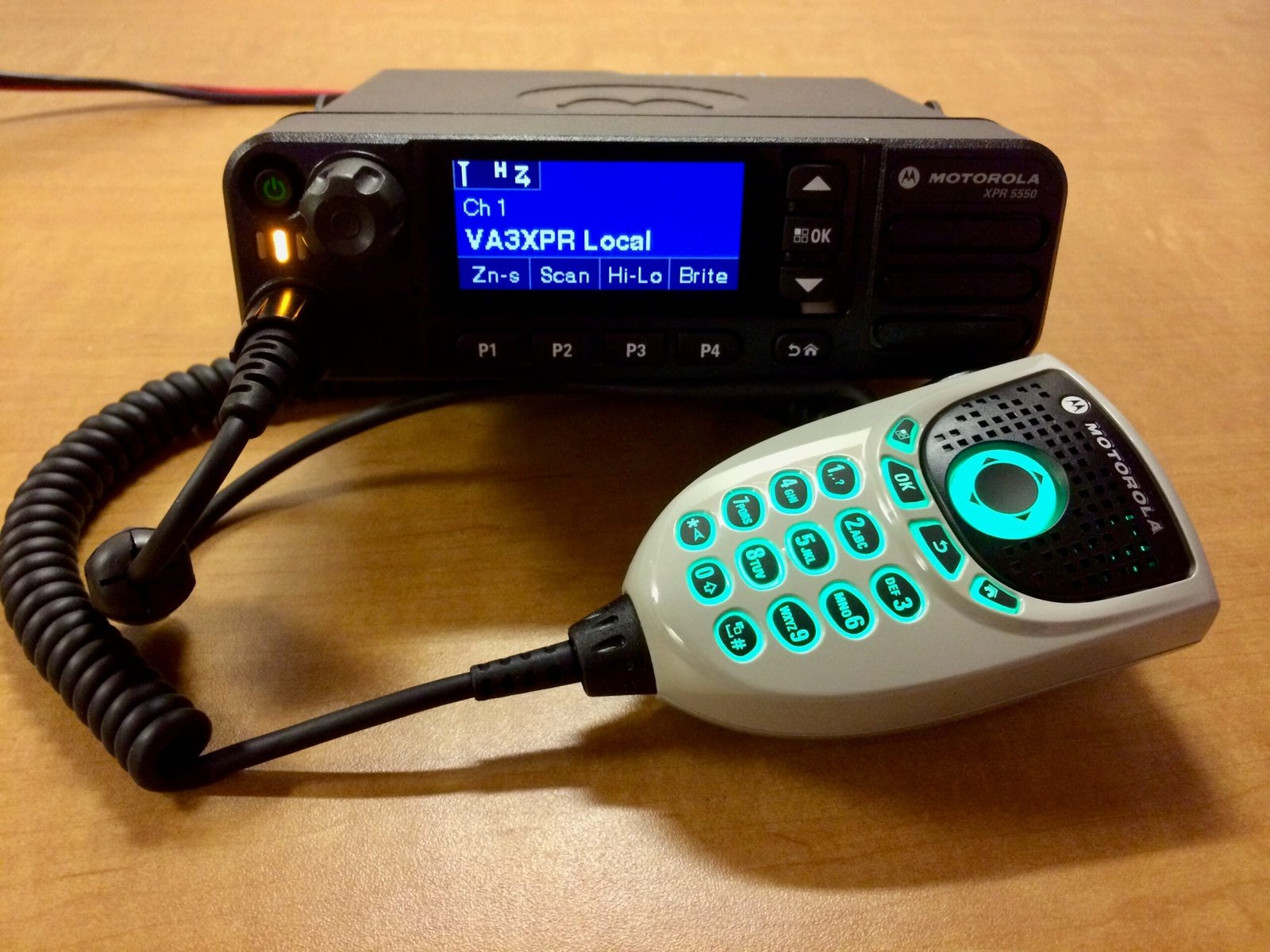
Compared to its predecessor, the XPR 4550, the XPR 5550 introduced a vibrant color display for improved visibility. While that was considered cutting-edge in 2014, the color display still holds up well today for navigating menus and reading text messages or contact aliases. The layout of the controls—knobs for volume and channel selection, plus programmable buttons—remains intuitive. Hams accustomed to scanning through extensive talkgroup lists or channels will appreciate how quickly they can jump to the settings they need.
Powerful CPU and Expandability
The XPR 5550 boasts a faster CPU than older MOTOTRBO models, leading to smoother transitions between channels, quicker menu navigation, and improved overall performance. This extra processing power makes the radio more responsive, especially when using advanced features like Linked Capacity Plus or IP Site Connect. Further expansions, such as third-party applications for text messaging, GPS mapping, and remote control, are also more feasible on this radio than on older models.
Versatile Installation Options
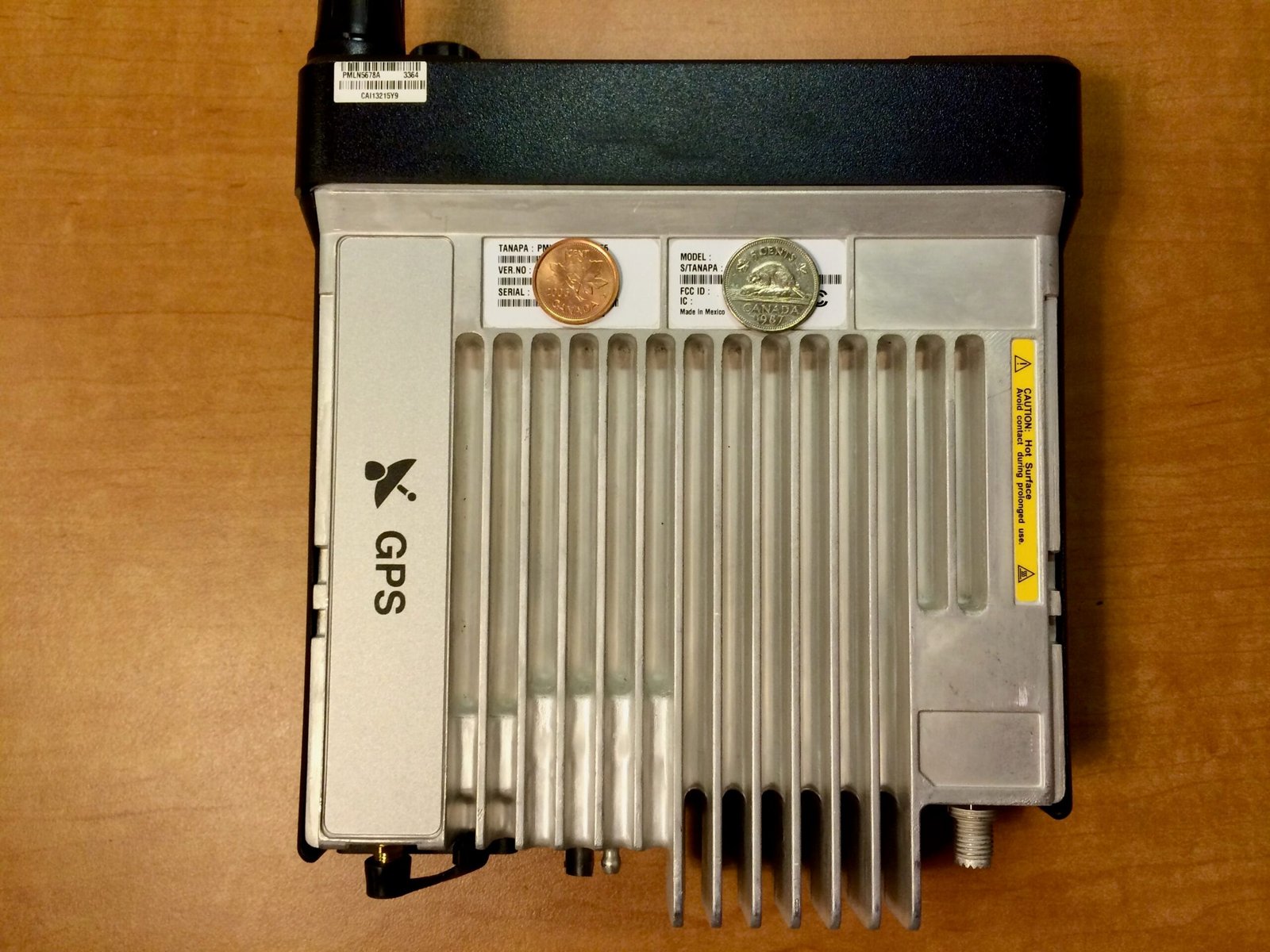
Because the radio is designed for commercial fleets, the XPR 5550 is rugged and sized to fit most vehicle mounting configurations. Hams who want to install the radio in a car, truck, or even a base station environment will find that the included mounting brackets and optional accessories make it easy to place and secure. Its relatively compact form factor, stable heat dissipation, and reliability are major benefits for both mobile and base station use.
What Makes It Still Relevant for Hams Today
DMR Popularity in the Amateur Radio Community
Over the last decade, DMR repeaters and networks have proliferated around the globe, and the XPR 5550 remains fully capable of accessing these systems. Many large-scale repeater networks—such as BrandMeister, DMR-MARC, and regional systems—support the talkgroups, timeslots, and color codes that the XPR 5550 can handle. Even in 2024, the XPR 5550’s feature set stands strong against newer models from various manufacturers in terms of audio clarity, reliability, and ease of programming.
Firmware Updates and Ongoing Support
Motorola Solutions has provided a series of firmware updates for the XPR series over the years, improving bug fixes, adding new features, and refining audio processing. While the radio is no longer the latest in the MOTOTRBO line, it continues to benefit from Motorola’s high standards of quality control and customer support. Many of these updates are accessible to amateur operators who have the appropriate software, ensuring that even older units stay current.
Excellent Build Quality and Durability
One of the main reasons hams still gravitate toward commercial-grade radios like the XPR 5550 is their ruggedness. Built to withstand daily use in professional environments, these radios often outlast cheaper amateur-grade models. Hams who enjoy outdoor activities like off-roading, hiking with mobile setups, or operating in extreme weather conditions will appreciate the XPR 5550’s reliability.
Advanced Features Suited for Amateur Use
The XPR 5550’s advanced features, from text messaging to GPS tracking, can be re-purposed for creative amateur projects. For example, GPS data can be used for APRS-like functionality if integrated with third-party software or external modules. The radio’s ability to handle IP Site Connect also allows amateurs to build or join wide-area networks that link multiple repeaters across different geographies.
Affordable Option on the Used Market
While the XPR 5550 was considered “mid-priced” for a commercial radio at launch, the used market in 2024 often presents these units at more attainable price points for ham radio operators. Because the radio has been in circulation for several years, many well-maintained units are available at reduced costs, making them an excellent value for amateurs looking for commercial durability without breaking the bank.
Programming and Codeplug Considerations
To fully leverage the capabilities of the XPR 5550, proper programming is essential. As a commercial-grade radio, the XPR 5550 uses Motorola’s CPS (Customer Programming Software) for all configuration, including channel assignments, talkgroup allocations, color codes, timeslots, and more. Here are some key points hams should keep in mind:
CPS Access and Licensing
Motorola’s CPS software typically requires a purchase or subscription to get legitimate access. Some hams manage to obtain it through their radio clubs or by partnering with local commercial dealers. Regardless, it’s important to use official software to avoid bugs, firmware corruption, or programming incompatibilities.
Understanding DMR Parameters
- Talkgroups: DMR talkgroups are a central concept. By configuring them correctly, you can participate in local, regional, and international discussions.
- Color Codes: Similar to CTCSS tones in analog systems, color codes are used to segment different user groups on the same repeater.
- Timeslots: Each DMR channel is split into two timeslots, effectively doubling frequency efficiency. Ensure you know which timeslot is designated for each talkgroup.
Building a Useful Codeplug
Start by gathering the details for repeaters and talkgroups you plan to use most. The XPR 5550’s large channel capacity lets you set up codeplugs that cover various geographic areas, plus special talkgroups for emergencies or local events. Many ham radio clubs share preconfigured codeplugs for popular networks, which can save you a great deal of time.
Firmware Upgrades
Whenever you get a used radio or if you have not updated in a while, make sure to check Motorola’s resources (or your local dealer) for the latest firmware releases. Upgrading your radio’s firmware can resolve known bugs and sometimes introduce new features or improvements that keep your XPR 5550 running optimally.
Pros and Cons
Pros
- Exceptional Audio Quality: The XPR 5550 delivers rich, full-bodied audio with excellent low-frequency response, making long conversations more enjoyable and less fatiguing to listen to.
- Powerful Audio Volume: This radio’s speaker output is designed for noisy environments, ensuring you’ll hear transmissions clearly, even in the loudest surroundings like a moving vehicle or a busy event.
- Rugged Construction: Built to meet MIL-STD specifications, the XPR 5550 is incredibly durable, designed to outlast typical amateur radios. Whether in harsh weather or demanding use cases, this radio is built to perform.
- Built-In Bluetooth: Integrated Bluetooth allows for wireless operation, enabling hands-free communication and cable-free programming, which is ideal for mobile setups and quick configuration changes.
- Integrated GPS: Standard GPS functionality provides precise location tracking, making it a great feature for outdoor enthusiasts, public service events, or emergency communication scenarios.
- Multicolor LCD Display: The vivid, multicolor LCD display is bright, clear, and easy to read, offering intuitive navigation of menus and settings, even while on the go. This feature adds significant convenience, especially when operating in mobile environments.
Cons
- Cost: Significantly more expensive than many amateur-oriented DMR mobiles, which can be a deterrent for newcomers or casual operators.
- Complex Programming: Requires proprietary Motorola CPS software and a more complicated programming process, which can challenge beginners.
- Limited 25 kHz FM Operation: For users wishing to operate on the standard 25 kHz FM channel width commonly used on ham bands, an additional Entitlement ID is required from Motorola. Acquiring this entitlement requires a valid MOTOTRBO CPS subscription, which can be a costly and time-consuming process for individual amateur radio operators.
Tips for Getting the Most Out of Your XPR 5550
If you want to unlock the full potential of the Motorola XPR 5550, consider these practical tips to enhance your overall experience and ensure you’re making the most of this reliable radio:
- Optimize Your Antenna Setup
- Quality Antenna: Invest in a high-quality antenna tuned for your band (VHF or UHF). This will improve both transmission range and reception clarity.
- Proper Grounding: Ensure that your vehicle mounting (or base station setup) has solid ground connections. Poor grounding can degrade signal quality, especially at higher power levels.
- Antenna Placement: For mobile setups, center-roof placement generally provides the best overall coverage. If that’s not feasible, aim for a location that is both elevated and free from major obstructions.
- Leverage Digital Features
- Text Messaging: Don’t overlook the radio’s text messaging feature. It can be especially helpful for discreet communication during public service events or emergencies, where voice transmissions might add to confusion or get drowned out.
- GPS and APRS Integration: Although the XPR 5550 doesn’t natively support APRS, you can integrate GPS data into a ham radio platform that processes location data. Tools or software that map DMR talkgroup IDs to callsigns can also be used in conjunction with location data for net control.
- Private Calls and Group Calls: Learn how to make targeted group calls and private calls to quickly communicate with specific stations during nets or emergency scenarios.
- Master the Radio’s Menu Navigation
- The color display makes menu navigation easier, but the deeper functions can still be complex. Spend time exploring the menu structure to become comfortable with scanning modes, digital contacts, and zone organization. Label your channels and talkgroups with descriptive aliases so you can select them without guessing.
- Experiment with Advanced Audio Settings
- Take advantage of the radio’s intelligent audio feature and noise suppression. In the CPS, you can tweak microphone gain, speaker equalization, and other settings to tailor audio performance to your environment. Crisp, clear audio not only helps you be heard, but also helps you hear others more effectively.
- Use External Accessories
- External Speakers: For mobile installations, an external speaker can vastly improve audio clarity, especially in loud vehicles.
- Data/Programming Cables: Keep a data cable handy to perform quick codeplug updates if your local repeater changes talkgroup assignments or if you travel to new areas with different DMR networks.
- Bluetooth or Wireless Options: Some XPR 5550 models (or variants) support Bluetooth for hands-free audio. This can be a game-changer while driving.
- Join Online Communities
- Numerous amateur radio forums, Facebook groups, and local clubs share codeplugs, best practices, and troubleshooting advice specifically for Motorola MOTOTRBO radios. By joining these communities, you can stay up to date with the latest tips, find solutions to programming challenges, and even compare notes on advanced modifications.
- Stay Legal and Informed
- Always confirm that your programming and operational practices comply with your local amateur radio regulations. While the XPR 5550 is Part 90 type accepted for commercial use in the United States, it can be utilized on amateur frequencies provided you follow all rules set forth by the FCC (or the relevant authority in your country). Keep your license current, respect band plans, and be mindful of power limits.
- Regular Maintenance and Firmware Checks
- Dust and Ventilation: Keep the radio’s cooling vents clear of dust, especially in vehicles that operate on dirt roads or in harsh climates.
- Microphone Checks: The microphone connector can accumulate grime over time. Clean it regularly to maintain consistent audio performance.
- Firmware Updates: Periodically check for official firmware releases or consult with your dealer. Keeping the radio’s firmware up to date ensures you have the latest bug fixes and feature improvements.
Conclusion
Even several years after its initial launch, the Motorola MOTOTRBO XPR 5550 continues to be a solid choice for amateur radio operators looking to incorporate digital voice technology into their setups. With its rugged build, large channel capacity, and versatile DMR features, the XPR 5550 can handle the demands of day-to-day ham use—whether you’re checking into local nets, supporting public service events, or exploring wide-area DMR networks.
For newcomers to DMR, the XPR 5550 offers a commercial-grade platform that provides excellent audio quality and reliability. Advanced users will appreciate the possibilities offered by firmware updates, text messaging, GPS integration, and wide-area networking via IP Site Connect or Linked Capacity Plus. Yes, it requires an investment in programming software and a learning curve, but the payoff is a highly capable radio that bridges analog and digital communications seamlessly.
At a time when digital communications are growing ever more prevalent in amateur radio, a radio like the XPR 5550 demonstrates its staying power by continuing to serve as a trusted workhorse. Whether you pick one up new or find a bargain on the used market, you’ll benefit from the same quality engineering and robust performance that have endeared it to countless ham radio enthusiasts over the years. With a bit of time spent on programming, experimentation, and leveraging its advanced features, the XPR 5550 will serve as a dependable companion on your ongoing ham radio journey—both today and in the years ahead.
The Review
Motorola XPR 5550
The Motorola XPR 5550 DMR mobile radio stands out for its exceptional audio quality, powerful speaker volume, and rugged MIL-STD construction, ensuring reliability even in the toughest environments. With built-in Bluetooth, integrated GPS, and a vibrant multicolor LCD display, it offers modern convenience for both mobile and base station use. However, its requirement for an additional Entitlement ID to enable 25 kHz FM operation may be a drawback for some users. Despite this limitation, the XPR 5550 remains a top-performing choice for hams prioritizing DMR and narrowband capabilities.
PROS
- Exceptional Audio Quality
- Powerful Audio Volume
- Rugged Construction
- Multicolor LCD Display
- Built-In Bluetooth
- Integrated GPS
CONS
- Cost
- Complex Programming Software
- Limited 25 kHz FM Operation
Review Breakdown
-
Build Quality & Durability
-
Audio Quality & Performance
-
Programming & Ease of Use
-
Features & Versatility
-
Value for Money